
Yes, you can automate WhatsApp for your business, and most SMEs should start with one high-frequency workflow, such as appointment reminders or order updates, rather than trying to automate everything at once. Meta Business Agent adds an AI layer for routine replies and bookings, but it only works safely with clear handover rules to a human. Get one workflow right first.
TL;DR:
- Automating WhatsApp for small businesses is most effective when starting with high-frequency workflows like appointment reminders or order updates.
- The WhatsApp Business Platform supports multiple agents, templates, and integrations, but requires a Business Solution Provider and proper compliance measures.
- A phased approach involving selecting a use case, testing on a small scale, and measuring KPIs ensures quick, measurable ROI, often within a few months.
- Costs include BSP fees, message charges, and possible development, with significant ROI often achieved through reducing no-shows and saving staff hours.
- Proper setup requires clear escalation rules, consent documentation, and avoiding automation excess or unplanned chatbot complexity to prevent customer frustration.
Table of Contents
- What is WhatsApp business automation and how does it differ from the app?
- Which WhatsApp workflows should you automate first?
- How does WhatsApp automation actually work behind the scenes?
- What privacy and compliance checks matter before you automate?
- How do you actually pilot WhatsApp automation step by step?
- What does WhatsApp automation cost and when does it pay off?
- How Flowlab helps SMEs get WhatsApp automation right
- What I’d tell any SME owner before they automate WhatsApp
- Get WhatsApp automation built properly, not bolted together
- Where to read the official documentation
- Sources
What is WhatsApp business automation and how does it differ from the app?
WhatsApp Business Automation means using rules, bots, or AI to send and answer messages without a person typing each reply. Whether you can do this properly depends on which WhatsApp product you’re using, and this is where most SMEs get confused.
The free WhatsApp Business App works for solo operators or very small teams. It gives you quick replies, away messages, and basic greeting automations, but it’s limited to one device and can’t scale to multiple agents working the same inbox.
The WhatsApp Business Platform, accessed through a Business Solution Provider (BSP), is built for volume. It supports:
- Multiple agents working from shared conversations
- Pre-approved message templates for outbound notifications
- Chatbot and CRM integrations
- A data processing agreement (AVV) with your provider, covering how customer data is stored and handled
One detail catches people out: any reply sent within 24 hours of a customer’s last message counts as a “service” conversation and costs far less than an outbound marketing template, as BSP guides for regulated markets explain. If you’re sending many messages a month or need several staff in one inbox, it’s time to look at the Platform via a BSP.
Which WhatsApp workflows should you automate first?
Not every message deserves automation. Some workflows pay for themselves within weeks; others just add complexity for no real gain. Here’s the order Flowlab typically recommends to SME clients, ranked by how fast they show measurable return:
- Appointment confirmations and reminders. This is usually the highest-value starting point. Automated reminders sent a day or a few hours before a booking are widely reported to cut no-shows and free up five to ten hours a week of admin time in small teams.
- Order confirmations and delivery updates. Customers expect a receipt and a status update without having to ask, and these fall neatly into the low-cost “service” message window.
- A tier-one FAQ chatbot. Handles the same five or six questions your team answers daily, such as opening hours, pricing, or returns policy.
- Lead qualification and CRM routing. Incoming enquiries get tagged and pushed straight into your sales pipeline instead of sitting unread.
- Consent-aware marketing and cart recovery. This comes last, and only once you’ve documented explicit opt-in, because unsolicited marketing messages carry real reputational and compliance risk.
Pro Tip: Pick the workflow your staff complain about most, not the one that sounds most impressive in a pitch deck. The boring, repetitive task is usually the one worth automating first.
How does WhatsApp automation actually work behind the scenes?
The stack sits on a handful of moving parts, and understanding them helps you brief a supplier properly rather than nodding along to jargon.
At the base sits the WhatsApp Business Platform (Cloud API), accessed through a BSP that handles the technical connection and billing. Sitting on top of that is either a no-code orchestrator such as n8n or Make, or a custom-built integration layer, which routes messages, triggers actions, and connects to your other systems. On top again sits your chatbot or LLM layer, which handles the actual conversation logic.
Practical building blocks include:
- Webhooks that trigger a workflow the moment a customer messages or a booking is made
- Approved templates for anything sent outside the 24-hour service window
- CRM and calendar integrations, so a booking or enquiry updates your existing systems automatically
- Observability, meaning logs and alerts so you know when a bot fails to understand a message
Meta’s own Business Agent can handle routine replies, recommend catalogue items, and book appointments, but Meta is explicit that it needs clear handover rules between AI/chatbots and human agents so it escalates anything complex, or anything a frustrated customer sends, straight to a human. Get that escalation logic wrong and you’ll find out from a one-star review, not a support ticket. Tools like n8n or Make let SMEs wire this together without a large development team.
What privacy and compliance checks matter before you automate?
Get this wrong and the fallout costs far more than the automation saves. A few checks are non-negotiable before you switch anything on.
- Avoid App-based contact sync where possible. The free Business App can prompt for address book access in ways that create data protection headaches; the API-based Platform doesn’t automatically upload contacts, which is one reason serious SMEs migrate.
- Sign an AVV (data processing agreement) with your BSP, and ask exactly where messages are stored and processed. Providers offering hosting closer to your own jurisdiction tend to simplify audits and reduce friction, which is why practitioners often favour them.
- Document opt-in for every marketing message. Verbal consent isn’t enough; keep a timestamped record.
- Tell customers when they’re talking to AI. A short disclosure line at the start of an automated chat avoids the awkward moment someone realises they’ve been venting to a bot.
How do you actually pilot WhatsApp automation step by step?
Skipping steps here is how “quick automation projects” turn into six-month messes. Follow this order and you’ll have something measurable within weeks.
- Pick one use case and set KPIs. Appointment reminders, order updates, or FAQ deflection all work. Decide upfront what success looks like, such as a percentage drop in no-shows or hours saved per week.
- Decide App or API. If you’re a single-location business with light volume, the free app may hold you for now. Multi-agent teams or CRM needs mean going via a BSP.
- Vet your BSP. Check hosting location, whether they offer an AVV, integration options, and what support looks like when something breaks at 11pm on a Friday.
- Draft and submit message templates for Meta approval, and set up consent logging from day one.
- Run a small internal pilot with one team or one location before rolling out company-wide.
- Measure, iterate, scale. Review weekly for the first month, then monthly.
Pro Tip: Run your pilot for at least two full billing cycles before judging it. The first fortnight almost always looks messy while templates get approved and staff adjust.
What does WhatsApp automation cost and when does it pay off?
Budgets typically split into four buckets: BSP fees and per-message costs, any no-code subscription (n8n or Make, for example), development or consulting fees for setup, and ongoing support once it’s live.
- Pilot phase: a few weeks, covering template approval, BSP setup, and initial testing
- Early ROI: within a few months, depending on how frequently the automated workflow runs
- Simplest ROI formula: (staff hours saved + reduced no-shows + converted leads) measured against total setup and running cost
Reminder automation alone is commonly linked to meaningful drops in no-shows and several hours of admin time reclaimed weekly, which for a small clinic or salon often covers the entire setup cost within the first quarter. Costs vary by scope, and getting a straight answer before committing matters more than any headline figure. Flowlab’s cost guidance for Singapore SMEs breaks down what typically drives the final number up or down.
How Flowlab helps SMEs get WhatsApp automation right
Flowlab’s method starts with discovery, not a sales pitch. We look at what your team actually does all day before recommending anything, then run a contained pilot, then iterate based on what the data shows.

For some businesses, a ready-made product like PriceFlow answers the question outright without custom build costs. For others, a no-code path such as n8n handles the job perfectly well on its own. Where the workflow touches multiple systems, existing CRM data, or needs judgement calls a bot can’t make, that’s when a tailored automation build earns its cost. Our complimentary app fit review exists precisely to work out which category you’re in before either of us spends a cent.
What I’d tell any SME owner before they automate WhatsApp
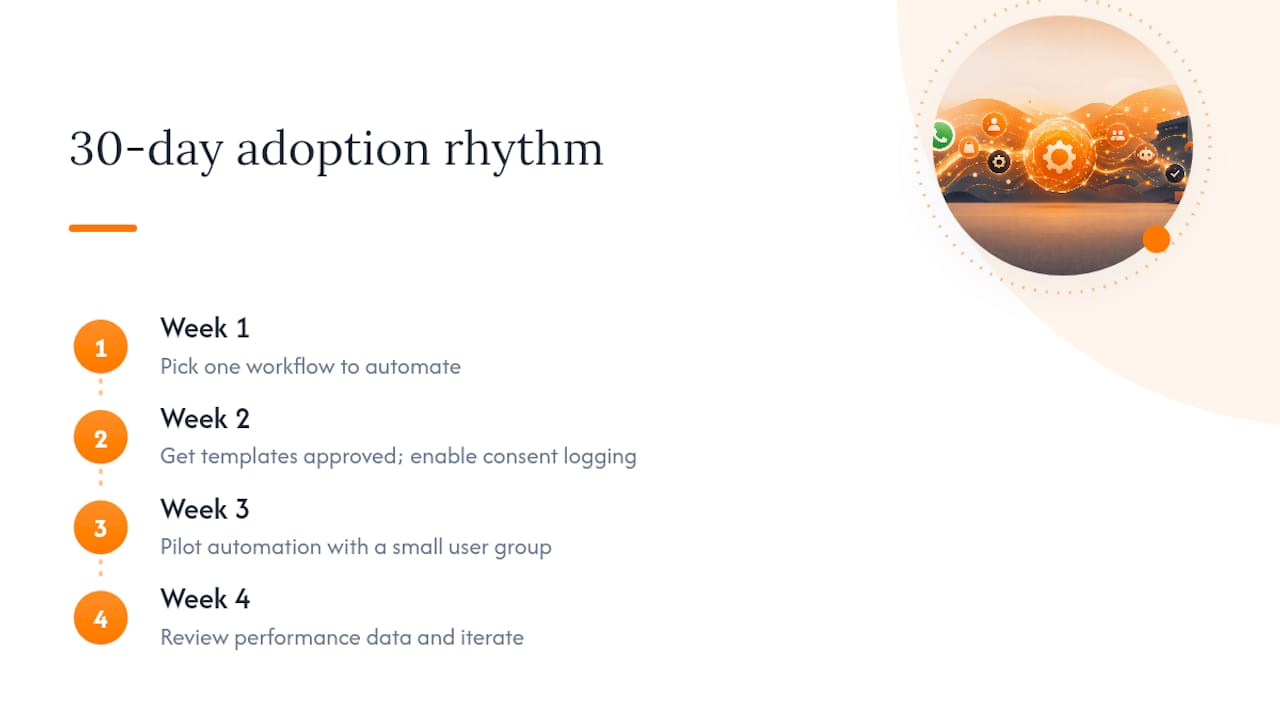
The businesses that get this right in thirty days follow a similar rhythm: pick one workflow in week one, get templates approved and consent logging live by week two, pilot with a small group by week three, and review the numbers properly in week four.
Three mistakes undo most of the value. Skipping consent logging is the one that bites hardest later, since retroactive proof of opt-in doesn’t exist. Automating too much too soon confuses customers and buries the genuinely useful replies in noise. And building a chatbot with no escalation path means the first angry customer becomes a public complaint instead of a five-minute fix.
Try a demo before committing to a build. It tells you more in twenty minutes than any spec document will.
— Ronald
Get WhatsApp automation built properly, not bolted together
Plenty of SMEs cobble together a no-code workflow and it holds up fine, right until volume grows or a customer query needs judgement a bot can’t make. Flowlab exists for exactly that gap. We map your actual operations first, free of charge, then tell you honestly whether a ready-made product, an adapted existing tool, or a custom build makes sense, without pushing you toward the most expensive option by default.

If you want a working example before deciding anything, try a Flowlab product demo to see how automated messaging, booking flows, and CRM handoffs behave in practice. If you’re still working out which route fits your operation, book a complimentary app fit review and we’ll tell you plainly what the simplest suitable solution actually looks like for your team.
Where to read the official documentation
For template approval rules and API specifics, go straight to the WhatsApp Business Platform documentation. Meta’s own Business Agent FAQ covers AI handover rules and rollout limits. For no-code orchestration examples, Zapier’s automation guide is a solid practical starting point.