
Geofenced attendance lets staff clock in and out from their phones, and the app accepts the punch only when the phone is inside a virtual boundary you draw around the worksite. For a Singapore SME, it replaces paper sheets and buddy punching with a record that is tied to a place and a time. It works well when you set a sensible radius, tell staff what is collected and keep the data you need for MOM. This guide covers each of those steps.
TL;DR
- A geofence is a boundary around a worksite. The app accepts a clock-in or clock-out only when the phone’s location falls inside it.
- Accuracy depends on signal, device and permissions. Allow for a radius of tens of metres, not a few steps from the door.
- Employers covered by the Employment Act must keep attendance and working-hour records. Collect location only when it serves that purpose, and tell staff.
- Plan a fallback for dead zones, flat batteries and phones that are switched off, with a manager approval step.
- Start from your workflow, then decide whether a ready-made product, an adapted one or a custom build is the simplest suitable route.
Table of Contents
- How geofenced attendance works
- How accurate is location-based attendance?
- What MOM and the PDPA expect
- Setting up geofence time tracking for one or more worksites
- What to check when choosing an attendance app
- What it costs
- Fallbacks when GPS or connectivity fails
- Try it on your own sites
- FAQ
- Sources
How geofenced attendance works
The idea is simple. You mark a worksite on a map and set a radius around it. An employee opens the app and taps to clock in. The app reads the phone’s location, checks it against the boundary and either records the punch with a timestamp or refuses it.
There are two common behaviours:
- Punch-time check. The employee taps, and the app validates the location at that moment. This is the most common setup for small teams, and the easiest to explain to staff.
- Automatic entry and exit. The phone’s operating system tells the app when the device enters or leaves the zone, and the app logs it. This is convenient, but it relies on background location permissions, which many staff will be reluctant to grant. A dwell setting, which waits until someone stays inside for a set time, avoids false logs from people simply walking past. Android’s developer guidance describes this approach.
Most searches for a GPS attendance app or location-based attendance mean the first behaviour: a clock-in button that only works on site. A good record then holds the employee, the time, the site, the result of the location check and any manager edits.
How accurate is location-based attendance?
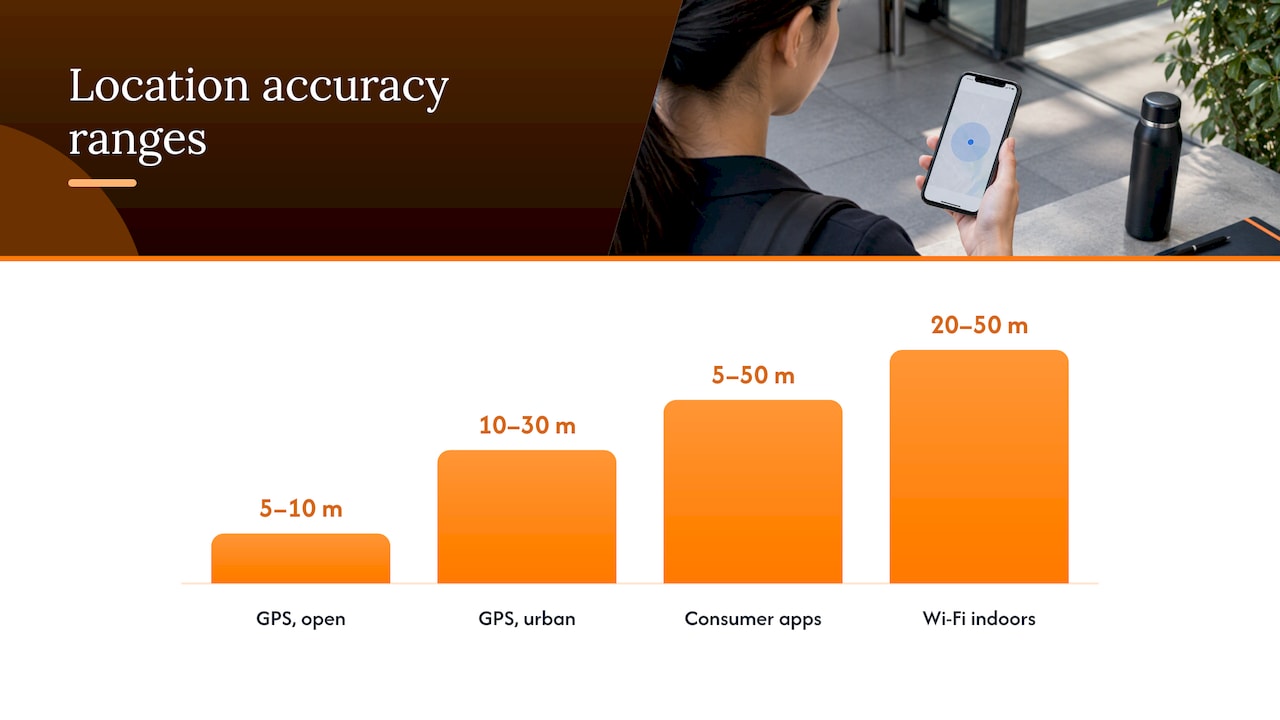
Better than paper, but not exact to the metre. Figures from Radar’s guide to geofencing accuracy put GPS at about 5 to 10 metres in open outdoor areas and 10 to 30 metres in urban outdoor settings. In most consumer apps, geofencing accuracy ranges from 5 to 50 metres depending on environment and device. The same source notes that Wi-Fi can help indoors (roughly 20 to 50 metres), while cell towers are a coarse fallback.
For Singapore, this matters in a few specific places:
- Dense towers and malls. Signals bounce between buildings, and a phone can place someone on the wrong side of the street.
- Basements and loading bays. GPS is weak or absent, so the app falls back to less precise signals.
- Multi-storey sites. A geofence is flat. It cannot tell the 3rd floor from the 30th.
The practical answer is a radius that fits the building and its surroundings. Android’s guidance suggests a minimum radius of 100 metres for the best results in its own geofencing service, which is a useful reference point when you are deciding how tight to go. A custom app that checks location at punch time can use a smaller zone. Still, test it at the entrance, the back door and the far corner of your premises before you tell staff it is live.
Other things that stop a clean record:
- Location permission set to “while using the app” or denied.
- Battery saver modes that throttle location.
- Phones in airplane mode, or with no mobile data at a remote site.
- Location mocking apps on rooted or modified devices.
A well-built app handles each of these with a clear message and a defined fallback, rather than a silent failure that leaves a gap in the record.
What MOM and the PDPA expect
This part is easy to get wrong, so it is worth being precise. It is general information. For a specific situation, speak to a lawyer or to MOM and PDPC directly.
Attendance records
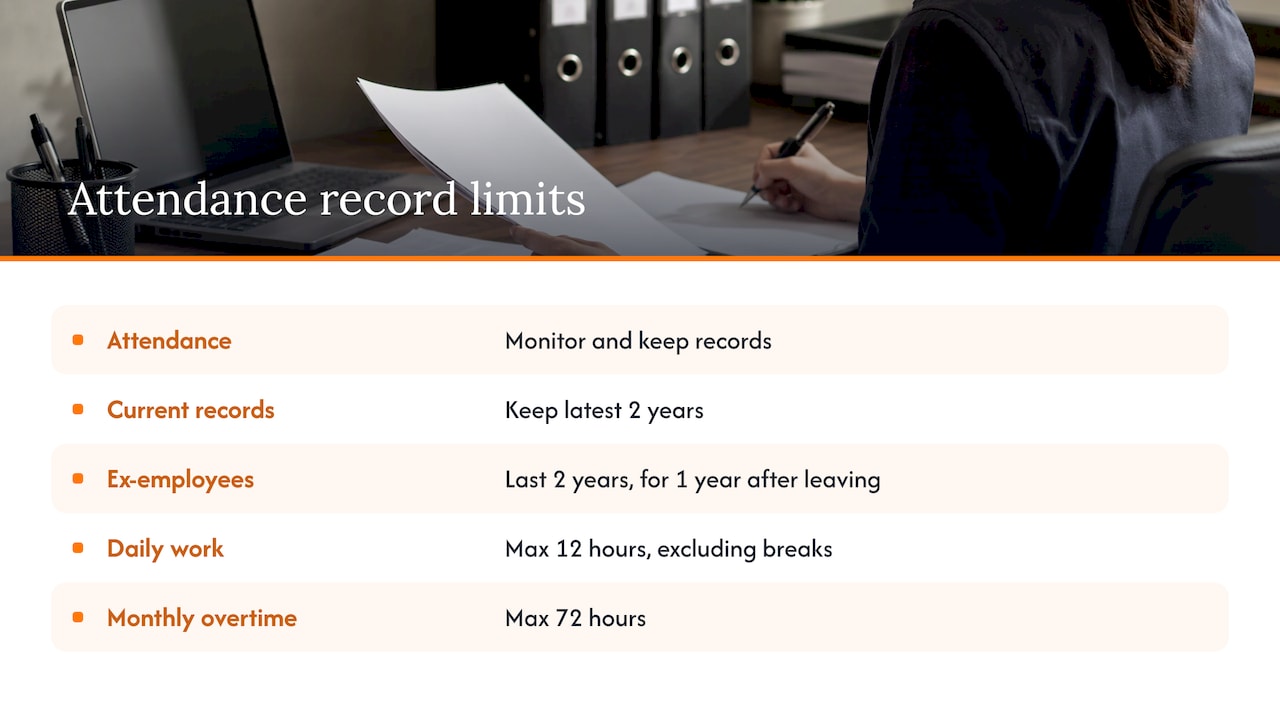
MOM requires employers to keep detailed employment records for employees covered by the Employment Act. These include working hours, public holidays and leave taken, and salary records including overtime. For current employees, keep the latest two years of records. For ex-employees, keep the last two years for one year after they leave. The Employment Records Regulations 2016 set the same retention periods in law.
MOM’s WorkRight Employers Toolkit also says that employers must monitor and keep a record of attendance and working hours. It states that, including overtime, an employee should not work more than 12 hours a day (excluding breaks) and that overtime must not exceed 72 hours in a month. A system that logs clock-in and clock-out times reliably makes it much easier to see these limits coming.
Location data and the PDPA
Location is personal data, so the Personal Data Protection Act applies. An article in the Singapore Academy of Law Journal explains that an employment relationship exception allows an organisation to collect personal data about an employee without consent where it is reasonable for entering into, managing or ending the employment relationship. Recording whether someone is at the worksite when they clock in is a reasonable fit for managing employment.
The same logic limits what you should do. A ComplyHQ guide to employee monitoring lists tracking company-issued devices during work hours, when staff have been told, as acceptable. It flags tracking outside work hours, or tracking personal phones without consent, as problematic. It names purpose limitation, consent and proportionality as the key principles.
In practice, that points to a short list of habits:
- Check location only at clock-in and clock-out, not continuously.
- Do nothing with location outside working hours.
- Tell staff in writing what is collected, why, who sees it and how long it is kept.
- Limit who can view location data to the managers and payroll staff who need it.
- Know what you will do if the data is exposed. A data breach must be notified to the PDPC if it is likely to cause significant harm or affects 500 or more individuals, no later than 3 calendar days after you determine it is notifiable.
Setting up geofence time tracking for one or more worksites
The order matters. Most problems come from choosing the tool first and the rules second.
1. Write down how attendance works today
List your sites, shift patterns, who approves hours and where the record ends up (payroll sheet, HR file, accounting software). Note the pain points: late sheets, disputed hours, manual re-keying. This is the workflow you want the app to follow. It is also the brief for any supplier, and you do not need technical language to write it.
2. Define each site
For each worksite, record the address, the entrance points and whether staff work in open air, inside a mall, in a basement or at client premises. Then pick a radius per site. A single shop in a quiet estate can run a tighter zone than a unit in a large complex. Roving staff, such as cleaners or technicians, may need several zones or an approved list of client sites.
3. Decide what happens when the check fails
Decide this before launch, not after the first complaint. A sound rule: if the location check fails, the employee can submit a request with a reason, and a named manager approves or rejects it. The record then shows that the punch was manually approved. Many SMEs also allow a brief photo or note for off-site work.
4. Brief your staff
Explain the purpose in plain words: it records working hours at the worksite, not movements after work. Show them where to find the setting, what the app can and cannot see, and who to ask if the app misbehaves. A short written notice is also good PDPA practice.
5. Pilot with one team
Run two pay cycles alongside your current method with a small group. Compare the app’s hours with the old sheet and note every mismatch. Adjust the radius and the fallback rules from what you see.
6. Connect it to approvals and payroll
The clock-in is only half the job. What saves time is the step after: managers reviewing exceptions, hours rolling into timesheets and a clean export to payroll. Our guide on timesheet approval workflows covers that step. Our piece on attendance tracking systems for SMEs looks at how it reduces payroll errors.
What to check when choosing an attendance app
Use these questions with any supplier, including us:
| Question | Why it matters |
|---|---|
| Is the radius adjustable per site? | Different buildings need different zones. |
| Does it check location only at punch time? | Keeps collection proportionate and battery use low. |
| What happens when the check fails? | You need a request and approval path, not a blocked employee. |
| Does it keep an edit history? | You need to show who changed a record, and why. |
| Can you export hours for payroll? | Avoids re-keying and the errors that follow. |
| Where is data stored, and who can see it? | Supports your PDPA duties. |
| Does it cover leave, overtime and public holidays? | These sit in the same MOM records. |
| Can it grow to more sites or staff? | Prevents a second migration later. |
What it costs
Prices for geofenced attendance vary widely in Singapore. Some tools charge a monthly fee per user or per site, and custom builds are priced as a project. Be careful when comparing: a low monthly fee can leave out setup, extra sites or payroll export. We do not publish a price list for PresenceFlow, because the cost depends on your sites, the number of staff and the approvals you need. Our free app fit review gives you a cost direction before you commit to anything.
Fallbacks when GPS or connectivity fails
Every attendance system needs a plan for bad days. These work well for SMEs:
- Manager-approved manual entry. The employee records the time and reason, the manager approves it and the log marks it as manual.
- Offline capture. The app stores the punch on the phone and syncs it when the connection returns. Check how the supplier handles the timestamp.
- Site-based alternatives. A shared tablet or a QR code at the entrance can cover basements and dead zones.
- Short grace rules. A set window for clock-in avoids penalising people for a slow signal.
Keep a count of manual entries each month. If one site produces many, the radius or the placement is probably wrong.
Our view on geofenced attendance
Most SMEs that ask us about geofencing do not need a bespoke system. They need clock-ins they can trust, a simple way to deal with exceptions and a clean handover to payroll. That is why we start with the workflow, not the technology.
Our approach is to recommend a ready-made product first, adapt it if your sites or approvals are unusual and build from scratch only when nothing simpler fits. For attendance, that starting point is PresenceFlow. If your process needs a different zone setup, approval chain or export, we can adapt it, and we will tell you the likely cost direction before any work begins.
We also think staff should know exactly what is collected. A location check at clock-in and clock-out, a clear notice and a fair fallback do more for trust than any feature list. Your conversation stays confidential throughout.
Ronald
Try it on your own sites
If you run one site or several and want attendance that is simple to record and easy to see, PresenceFlow is where we would start. We will first look at how your team clocks in and who approves hours today, then tell you whether the ready product fits, needs adapting or whether a custom build is warranted.

See the PresenceFlow product page ↗, watch the live attendance demo ↗ or book a free app fit review ↗. For more on how we compare options, read our guide to attendance software in Singapore or the overview of our attendance management system.
FAQ
Is geofenced attendance legal in Singapore?
Yes, for the purpose of managing employment, provided you collect only what is reasonable and tell staff. The PDPA’s employment relationship exception covers data needed to manage the employment relationship. Limit collection to clock-in and clock-out, and avoid tracking outside work hours.
How accurate is a GPS attendance app?
In open areas GPS is typically within 5 to 10 metres, and in urban settings within 10 to 30 metres. Indoors and in basements it is less reliable. Set the radius to suit each site and test it at every entrance before launch.
What records do I need to keep?
If your staff are covered by the Employment Act, MOM requires working hours, leave and salary records, including overtime. Keep the latest two years for current employees. For ex-employees, keep two years of records for one year after they leave.
What if an employee’s phone cannot get a location?
Use a request-and-approve path. The employee submits the time with a reason, a manager approves it and the record is marked as manual. A shared tablet or QR code at the site can serve as a backup in dead zones.
Can geofencing work for staff at several sites?
Yes. Each site gets its own boundary, and staff are assigned to the sites where they may clock in. For roving teams, you can use an approved list of client locations with manager approval for anything outside it.
Sources
- Create and monitor geofences, Android Developers
- How accurate is geofencing?, Radar
- Employment records, Ministry of Manpower
- Employment (Employment Records, Key Employment Terms and Pay Slips) Regulations 2016
- WorkRight Employers Toolkit, Ministry of Manpower
- Data protection implications of modern employee monitoring, Singapore Academy of Law Journal
- Employee Monitoring and the PDPA, ComplyHQ
- Report Your Organisation’s Data Breach, PDPC