
Onboarding users to new software works when you start before the software arrives. Define the workflow problem, involve the people who do the work, train each role on its own tasks, keep support in place after launch, and check adoption at set points. This guide sets out that plan for a Singapore SME, in the order you would follow it.
TL;DR
- Map the current process and agree two or three measurable goals before anyone is trained on anything.
- Involve frontline staff early. They know the exceptions and workarounds that managers often miss.
- Train by role, in a safe practice setup with realistic tasks, not in one demo session.
- Name a few champions as first-line peer support, and keep help available after go-live.
- Review adoption at 30, 60 and 90 days, and fix the cause (process, setup or training) rather than blaming users.
Table of Contents
- Start with the workflow, not the software
- Prepare your team and plan the rollout
- Train each role on its own tasks
- Adoption strategies that keep people using the tool
- Handling resistance, questions and feedback
- Measuring whether onboarding is working
- Mistakes to avoid
- See it working before you decide
- FAQ
- Sources
Start with the workflow, not the software
Most onboarding problems begin earlier than onboarding. If nobody can say which problem the software solves, nobody can explain to staff why they should change how they work.
Before the rollout, we suggest four steps.
- Interview the right people. Talk to the sponsor, the managers and the staff who perform every step. Intelligex recommends stakeholder interviews with all three groups to uncover pain points, useful existing practices and concerns before software is chosen or configured.
- Include frontline staff. A Singapore implementation analysis from Hybrid Analytica notes that end users understand operational details leadership may miss, and that involving them early improves requirements and ownership.
- Map the process from start to finish. SEL’s SME guide on process mapping suggests recording who does each step, what information they use and where hand-offs happen, then marking delays, errors, re-entered data and workarounds.
- Fix the process before you automate it. The same guide recommends removing steps that add no value, simplifying hand-offs and agreeing one standard way of working before deciding what the software should do.
If you have never mapped a process, our guide to process mapping for small businesses walks through it. If you want to find the slowest step quickly, identifying process bottlenecks in an afternoon with spreadsheets is a good starting point.
Write a short problem register
Once you have mapped the process, list the three to five problems that matter most. Next to each, write how you measure it today and what you want it to become. Examples for a small business: time to close the day’s sales, number of times the same customer detail is typed in, or how many enquiries lose a follow-up.
This list does two jobs. It gives staff a plain reason for the change, and it stops the project growing. When someone asks for one more feature, you ask whether it helps one of the listed problems.
Keep the first version narrow
Aim at the core pain point first. Roll out to one team or one process, learn from it, then widen. A narrow start also makes onboarding easier, because there is less to teach and less to go wrong in the first weeks.
Prepare your team and plan the rollout
Good onboarding is a small project with an owner. Hybrid Analytica’s guidance includes assigning an internal project owner and documenting key workflows as standard operating procedures (SOPs). The SOPs serve as the reference you configure against and use to check what the vendor promised.
A Singapore managed IT provider’s checklist on what to do before giving employees access to new software covers the practical items:
- involve IT, department leaders and a project manager;
- define access roles before anyone logs in;
- clean your data and run a test migration;
- test configurations in a sandbox with realistic use cases;
- plan training, communication and support after launch.
For an SME with five to fifty staff, this does not need a committee. It needs one named owner, one person who understands the data, and one or two people from the teams who will use the tool every day.
Consult users before launch
This is not only a small-business habit. GovTech Singapore’s account of rolling out iCON 2 found that involving end users during iterative development surfaced problems earlier and helped prevent bottlenecks at deployment. The scale is different from yours, but the lesson holds: show people the tool while you can still change it.
Tell people why, before you tell them how
Explain the problem first and the software second. AGS Enterprises suggests involving key users in demos and addressing concerns candidly, including worries about job impact, technical confidence and data migration. Say plainly what changes for each person, what stays the same, and who they can ask.
A simple announcement works well:
- The problem we are fixing, with one number from your register.
- What the new tool will do for this team in the first month.
- When training happens and how long it takes.
- Who the champions are and where to ask questions.
Train each role on its own tasks
A single walkthrough for everyone leaves cashiers sitting through report settings and managers missing approvals. Train by role.
VASUYASHII’s staff training plan recommends a role-to-task matrix: for each role, list the workflows, decisions, permissions and reports it needs, what it must not control, and what evidence shows it is ready. Here is a simple version for a retail or service business.
| Role | Must be able to do | Should not need to touch | Readiness check |
|---|---|---|---|
| Daily user (e.g. counter staff) | Complete the everyday task from start to finish, handle one common exception | Settings, pricing rules, user access | Completes three real-looking tasks without help |
| Manager | Review, approve, run the weekly report | Technical configuration | Produces the weekly report and approves one exception |
| Administrator | Add users, set roles, correct data | Day-to-day entry | Adds a user with the right role and reverses an error |
| Champion | All daily tasks plus common questions | Admin settings | Helps a colleague solve a problem unaided |
Practise in a safe setup
The same plan suggests a sandbox with realistic scenarios. Demonstrate a complete task, let the learner repeat it independently, then practise the exceptions, such as a refund, a duplicate record or a missing field. Finish with a short readiness check.
Time the training
ERPImplementation.eu, writing about larger ERP projects, suggests intensive sandbox training for key users four to eight weeks before go-live, then cascade training for business users one to three weeks before. For a lighter tool you can compress this, but the order is useful: key people first, everyone else shortly before launch so the learning stays fresh.
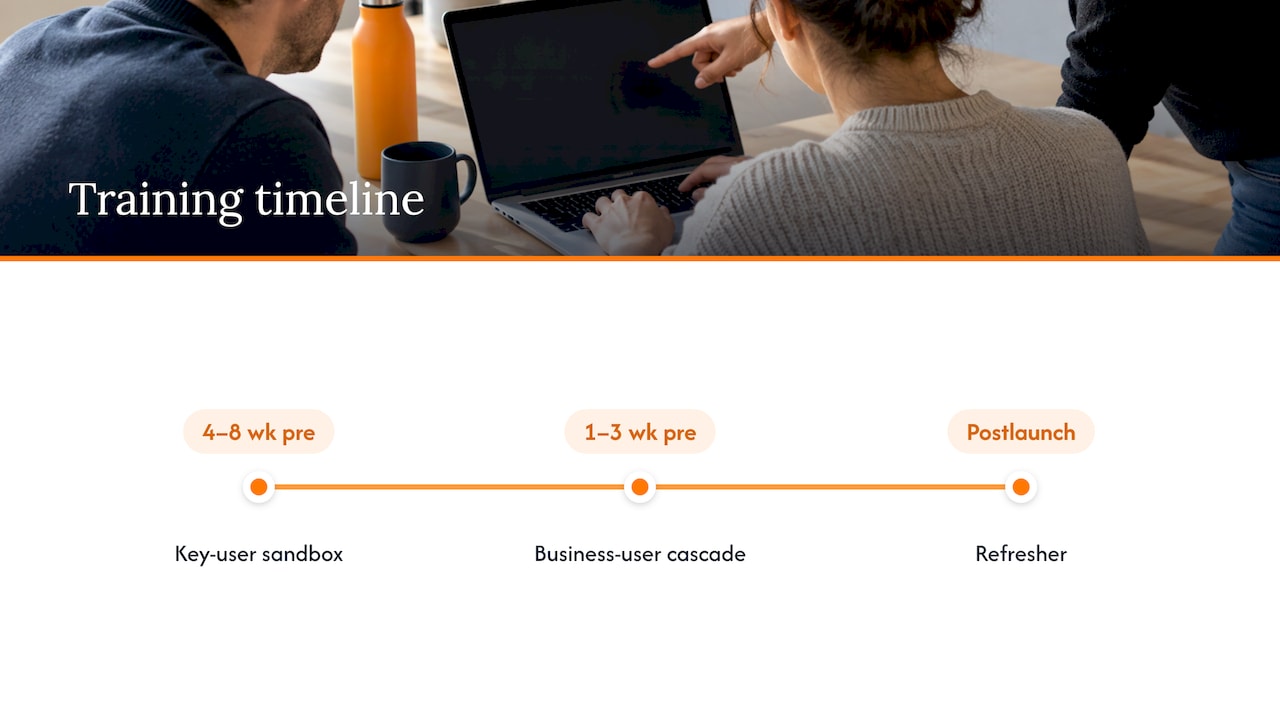
Treat training as more than a single day. Hybrid Analytica lists one-day training and ending support at go-live among the common reasons implementations fail in Singapore. Plan a refresher a few weeks in, once people have real questions.
Adoption strategies that keep people using the tool
Training gets people started. Support keeps them going. NUS Computing’s perspective on enterprise systems is that adoption depends on user behaviour and support structures, not only on what the system can do. Standard manuals and FAQs help with routine use, while personalised help, peer networks and super-users build confidence and encourage broader use.
In practice, for an SME:
- Pick champions. ClickUp recommends a small group of power users who test features, give feedback and act as first-line peer support during rollout. One champion per team is enough.
- Personalise by role. Planergy suggests involving end users before purchase, phasing the implementation, tailoring onboarding by role and offering several learning formats.
- Write one-page guides. A role-specific page with the five most common tasks beats a 40-page manual. AVC Software Consulting’s post-go-live playbook recommends exactly this kind of short guide.
- Keep a visible place for questions. A shared chat or a weekly 15-minute slot works. What matters is that people know where to ask and get an answer quickly.
- Plan floor support in the first weeks. Someone who can sit beside a user in the first days saves hours of frustration. Our 10-step hypercare plan for post go-live support shows how to structure that period.
Handling resistance, questions and feedback
Some people will be slow to switch. Usually there is a reason, and it is worth finding out which one.
Softabase’s change management guide suggests listening before confronting. Ask privately whether the person needs help, has a genuine workflow concern, feels uneasy, or is choosing not to adopt. It separates users who cannot adopt because they need help from those who will not, and it advises against public shaming or group threats.
A short routine for managers:
- Check the data first. Is this person actually avoiding the tool, or is their task missing from the setup?
- Ask one open question in private: what is getting in the way?
- If it is a skill gap, pair them with a champion.
- If it is a workflow concern, write it down and test it against your SOP. Sometimes the person is right and the setup needs changing.
- Report back on what you changed, so people see that feedback has an effect.
After go-live, AVC’s playbook recommends surveying users and sorting issues into three types: configuration, training or process gaps. Each has a different fix. A configuration gap needs a change in the tool, a training gap needs a refresher, and a process gap needs a decision from the owner.
Measuring whether onboarding is working
Compare results with the baseline in your problem register, and add a few adoption signals. Softabase proposes 30-, 60- and 90-day checkpoints that look at login activity, core-task completion, use of the old system, satisfaction, data quality and support-ticket trends.
A simple review table:
| Checkpoint | What to look at | What it tells you |
|---|---|---|
| 30 days | Logins, core task completed in the tool, old system still in use | Whether people have started |
| 60 days | Data quality, support questions by topic, satisfaction | Whether the setup and training fit |
| 90 days | Your original problem measures against baseline | Whether the project solved the problem |
If the old spreadsheet is still open on someone’s desk at day 30, ask why. It may point to a missing feature, an unclear step or a habit that needs a gentle nudge.
Mistakes to avoid
Hybrid Analytica’s Singapore analysis points to a consistent set of implementation mistakes. In plain terms:
- choosing software from a demo before defining the problem;
- leaving end users out of the decision;
- starting without documented processes;
- treating training as a one-day event;
- ending support the day you go live.
To this we would add one: trying to roll out everything to everyone at once. A narrow first release is easier to teach, easier to support and easier to measure.
Our view on onboarding
When SME owners come to us, they usually ask about features. We would rather start with the workflow. Who does each step, where does it slow down, and what would a good result look like in numbers?
Onboarding is much easier when the tool fits the way people already work. That is why we recommend the simplest suitable route first: a ready-made product if it covers the need, an adapted product if it nearly does, and a custom build only when the workflow really calls for it. Less to build usually means less to learn, and a lower cost.
We also think staff should see the tool early. A short demo with the people who will use it every day tells you more than a long requirements document. Our app fit review is free and confidential, and it is meant to give you a clear view of the most economical option and the likely cost before any development starts, without technical jargon or pressure to commit.
Ronald
See it working before you decide
If you are choosing software for the first time, or replacing a tool your team has outgrown, the quickest check is to let the people who will use it try it. Our product demos let you and your staff run through real tasks, such as a sample sale from product to payment in POSFlow.
We build and adapt apps for Singapore SMEs, from ready-made products for point of sale, queues, events, pricing, leads and attendance to custom web apps and internal tools. If your workflow does not fit a standard product, see how we approach custom software development in Singapore, or start with a free app fit review at flowlab.works ↗. You can also read how SME business automation can remove repeated admin work, and how to find the best workflow tools and prove ROI in 4 to 8 weeks.
FAQ
How long should onboarding to new software take?
It depends on the size of the tool and the team. For a narrow first release, many SMEs can train key users first and everyone else shortly before launch. Plan support and a refresher for at least the first 90 days, which matches the 30, 60 and 90-day review points above.
Who should lead the onboarding?
Name one internal project owner who has the authority to make decisions about process and access. Add a champion in each team for day-to-day questions. The vendor or developer can configure and train, but someone inside the business needs to own the result.
What if staff keep using the old spreadsheet?
Ask privately why, before treating it as refusal. The cause is often a missing step in the setup, a gap in training, or a task the new tool handles awkwardly. Sort the issue into configuration, training or process, fix that, and agree a date after which the old file is retired.
Do small teams need formal training plans?
Yes, but a light one. A role-to-task list, a sandbox practice session, a one-page guide per role and a named person to ask are enough for most small teams. The aim is that each person can complete their own tasks confidently and knows where to get help.
Should we choose software first and plan onboarding later?
Plan them together. Defining the problem and involving end users before you choose makes the tool a better fit, and a better fit is easier to learn. Our free app fit review is designed to help with exactly this step, before any build begins.
Sources
- A 4-Phase Guide to New Workflow Rollouts (Intelligex)
- Why Software Implementation Projects Fail in Singapore (Hybrid Analytica)
- Process Mapping Before Automation: An SME Guide (SEL)
- What Should a Business Do Before Giving Employees Access to a New Software System
- Rolling out iCON 2: Lessons in change management (GovTech Singapore)
- How to Talk to Your Team About Software Changes (AGS Enterprises)
- How to Train Staff on New Software: 30-Day Plan (VASUYASHII)
- ERP Training Program 2026 (ERPImplementation.eu)
- Unlocking the True Potential of Enterprise Systems (NUS Computing)
- How to Create a SaaS Implementation Checklist (ClickUp)
- User Adoption Strategies: Software Adoption That Works (Planergy)
- The 90-Day Post-Go-Live Playbook (AVC Software Consulting)
- Software Change Management: Get Your Team On Board (Softabase)