
If you run SME or community events and need registration that sets up fast and gives you a clear view of who has actually shown up, pairing EventFlow with PresenceFlow is the practical choice for most organisers. If you are selling thousands of public tickets or running a multi-track enterprise conference, a self-serve ticketing platform or a larger enterprise system suits that scale better. For everything in between, expect less setup time and one integrated view of attendance instead of three disconnected spreadsheets.
TL;DR:
- Events by invitation should prioritize guest list privacy and CRM sync over payment processing, while public ticketed events need sales, marketing attribution, and refund tracking.
- Conferences with multiple tracks need separate workflows for attendee passes, exhibitor badges, and session signups, while recurring meetups usually need a lighter setup.
- Compare per ticket fees with a scoped project fee, and confirm whether badge printers, extra staff logins, CRM sync, and exports cost extra.
- Before launch, run a complete registration and check in test, then verify duplicate entries, cancellations, lost confirmations, and offline access with staff.
Table of Contents
- Which FlowLab products match your event type
- What to look for when evaluating registration software
- How registration pricing models work and what to budget
- Matching your event format to the right registration approach
- Setup timeline and what to test before you launch
- How FlowLab approaches event registration and attendance
- Why fitting software to your workflow beats forcing the reverse
- Get a complimentary app fit review before you commit
- FAQ
Which FlowLab products match your event type
Before comparing features line by line, it helps to know which product actually matches your event. We built our catalogue around the jobs organisers repeatedly ask us to solve, rather than around a long settings menu that tries to cover every scenario at once.
- EventFlow handles registration, guest arrival workflows and on-site operations from the moment someone signs up to the moment they walk through your door.
- PresenceFlow captures attendance and turns it into a live operating view, so you can see who is in the room without chasing a sign-in sheet.
- QueueFlow supports events with on-site queuing needs, such as registration desks or staggered entry points at busier venues.
- LeadsFlow suits conferences and trade-style events where capturing exhibitor or sponsor leads matters as much as tracking attendees.
Here is how those map to common event formats:
- Public ticketed events with online sales and marketing needs: EventFlow for the registration and arrival flow, with PresenceFlow layered on for check-in.
- Invitation-only events, such as galas or private briefings: EventFlow adapted to your guest list workflow, keeping data closed to invited names only.
- Multi-track conferences: EventFlow for registration variety (sessions, workshops, exhibitor passes) combined with PresenceFlow for live attendance across multiple rooms.
- Small meetups and recurring community sessions: a lighter EventFlow setup, often without the full arrival workflow, since the group and venue rarely change.
Setup time and cost shape vary by how much the product needs to adapt to your existing process. A straightforward registration and check-in pairing for a single event is typically the fastest to configure. A build that needs to sync with an existing CRM or handle several ticket types and workflows in parallel takes longer, because it involves more decisions about data fields, permissions and integrations rather than more lines of code. Pricing for FlowLab product lines is scoped per project or per plan depending on whether you need a one-off event build or an ongoing subscription, and the exact figure is confirmed during a fit review rather than quoted blind. Industry buyer guides commonly group registration tools this same way, by public ticketing, invitation-first and enterprise or multi-track use, which is one reason deciding by event type reduces choice friction rather than by feature lists alone.
If your stack already includes a CRM for marketing or sales, it is worth checking how a prospective registration tool fits before comparing feature rows. Our own look at CRM options for small teams covers the kind of integration questions that matter most for invitation-first events.
What to look for when evaluating registration software
Most registration platforms look similar on a pricing page. The differences show up once you are three weeks from the event and trying to fix something on-site. A short checklist keeps you from discovering a gap too late.
Registration and ticketing basics:
- Custom registration forms with conditional fields (so a sponsor sees different questions than a general attendee).
- Multiple ticket or pass types, including free, paid and invitation-only categories in the same event.
- Waitlist handling and automatic confirmation emails that do not need manual follow-up.
Attendance and on-site operations:
- QR code or badge-based check-in that staff can run from a phone or tablet without a laptop at the door.
- A live dashboard showing who has arrived, useful for catering counts, security and simply knowing when to start.
- A staff-facing app that works offline or on patchy venue Wi-Fi, since check-in desks are often where connectivity is weakest.
Integration and data needs:
- Export to spreadsheet or CRM formats your team already uses, so attendee data does not get stuck in one system.
- Sync with marketing tools if you plan to follow up with attendees after the event.
- Clear ownership of attendee data, particularly for invitation-only or confidential guest lists.
Support and configuration:
- A support channel that responds within a working day, not just a help-centre article.
- Configuration that does not require a developer on your team to change a form field or add a ticket type.
- A clear scope of what is included if you need something adapted rather than built from the default template.
Buyer guides and reviews for B2B and corporate events consistently flag CRM integration depth and registration flow logic as the features that separate a smooth event from a frustrating one, which matches what we hear directly from SME organisers during fit reviews.
Pro Tip: Run your check-in flow with five test registrations before the event, including one deliberately broken entry (duplicate email, missing name), so your desk staff know what an error actually looks like on the day.
How registration pricing models work and what to budget
Registration software pricing tends to follow one of three shapes, and knowing which one you are looking at changes how you should budget.
- Percentage plus fixed fee per ticket, common on self-serve ticketing platforms, where the cost scales directly with ticket sales.
- Flat monthly or annual subscription, suited to organisers running several events a year who want predictable costs regardless of volume.
- Scoped project fee, typical for a build adapted to your specific workflow, where cost reflects the setup and integration work rather than ticket count.
Market review pages note that hidden costs like custom integrations and on-site hardware often sit outside the headline price, and that applies whichever pricing shape you choose. Before signing anything, check whether badge printers, extra staff logins, CRM sync and data export are included or billed separately.
As a worked example only, say your event has several hundred attendees and you are comparing a per-ticket platform charging a percentage fee against a flat scoped project fee. With typical percentage rates plus fixed fees per paid ticket, the percentage fee can take a noticeable cut from ticket revenue before fixed fees are added. A flat project fee sidesteps that scaling entirely, which is why organisers running free or low-cost events often prefer it. Our products, including EventFlow and PresenceFlow, carry no published list price. Cost depends on scope and is confirmed during a complimentary fit review before any commitment.
Matching your event format to the right registration approach
The right setup depends less on event size and more on what you need visibility into. A 50-person workshop and a 500-person public conference can need similar registration logic if both involve multiple session types.
- Public ticketed events need visibility into sales volume, marketing attribution and refund handling, since tickets are sold to strangers rather than invited guests.
- Invitation-only events, such as client appreciation evenings or private briefings, need tight CRM sync and guest-list privacy more than payment processing.
- Conferences with multiple tracks or exhibitors need registration that handles several workflows at once: attendee passes, exhibitor badges and session sign-ups, often with lead capture layered on for sponsors.
- Meetups and recurring community sessions need the lightest possible setup, since the same group often returns monthly and a heavy workflow adds friction rather than removing it.
If your event sits between categories, for example, an invitation-only conference with a handful of paid add-on workshops, build around the dominant need first. Privacy and guest-list control usually matter more than payment flexibility in that scenario, so start there and layer in ticketing for the smaller paid component. Organisers running appointment-style sessions alongside a main event, such as workshop slots or one-to-one briefings, often find it worth reviewing scheduling tools built for SMEs as a companion to the main registration flow rather than trying to force one tool to do both jobs.
Setup timeline and what to test before you launch
A simple registration and check-in setup for a single event is generally quick to configure once your form fields and ticket types are confirmed. A build that needs CRM sync, multiple workflows or exhibitor management takes longer, because the extra time goes into mapping data fields and permissions correctly rather than building more screens.
- Confirm your event structure first: ticket types, session tracks and any invitation-only segments, since this drives every later decision.
- Assign an owner for registration data, usually whoever manages your CRM or mailing list, so sync settings are agreed before go-live rather than during it.
- Configure check-in and staff access, including how many devices need login and whether staff need offline access at the door.
- Run a full end-to-end test: register a test attendee, receive the confirmation, scan the check-in code and confirm the attendee shows up correctly on the live attendance view.
- Test the failure cases too: a duplicate registration, a cancelled ticket and a manual check-in override for someone who lost their confirmation email.
Testing-focused reviews of registration platforms consistently point to payment-path friction and on-site check-in as disproportionate sources of attendee complaints, which is exactly why the end-to-end test in step four matters more than most organisers expect going in.
How FlowLab approaches event registration and attendance
We start every event software conversation the same way we start any SME project: by understanding the workflow before recommending a product. For event registration specifically, that usually means establishing whether an organiser needs arrival visibility, attendance capture, or both, before talking about configuration.
Attendance that is simple to record and easy to see, reviewed against how your event actually runs rather than against a generic feature list.
EventFlow handles the registration and guest arrival side: forms, ticket types and the workflow from sign-up to walking in. PresenceFlow then takes that arrival data and turns it into a live operating view of who has checked in, which matters for catering counts, security and simply knowing when a session can start. Combined, the two products cover the full loop from registration through to the moment someone is actually in the room, without needing a separate spreadsheet to reconcile the two.
- A complimentary app fit review looks at your current registration process and identifies the most economical path, whether that is a ready product, an adapted one, or a custom build.
- We clarify likely costs before development starts, so there are no surprises partway through scoping.
- Confidentiality is maintained throughout, which matters for invitation-only guest lists and internal attendee data.
A small professional association recently needed a way to confirm arrivals at a members-only event without a volunteer manually ticking names off a printed list at the door. Moving check-in to a scanned confirmation with a live arrival view removed that manual step entirely and gave organisers a running headcount without anyone needing to ask.
Why fitting software to your workflow beats forcing the reverse
Most procurement mistakes we see with event software come from picking a tool for its feature list rather than for how it fits the actual workflow on the day. A platform with forty configuration options is not an advantage if your event only needs three of them, and every unused option is still something your staff have to understand before check-in opens.
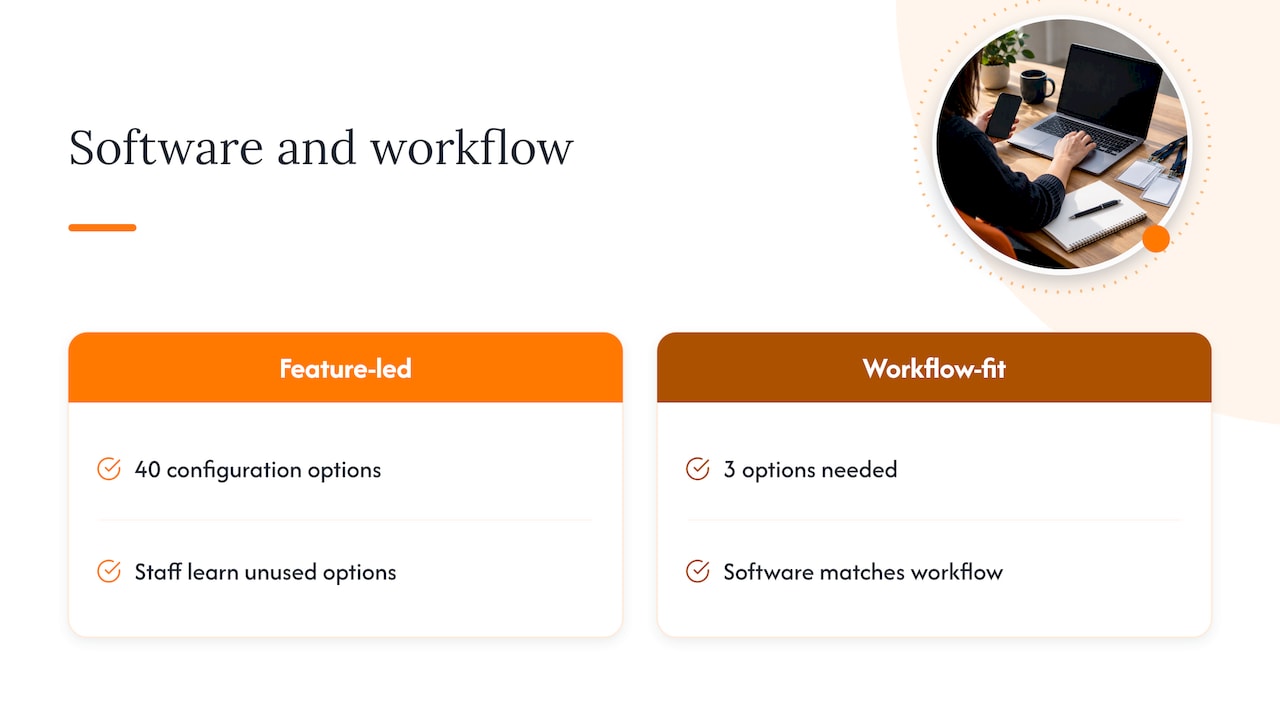
The common error is starting with the software and bending the event to match it: cutting a ticket type because the platform does not support it cleanly, or running a manual workaround because the built-in workflow does not match how your door staff actually operate. Starting from the workflow and then choosing software that matches it avoids most of that friction.
A bigger enterprise platform earns its complexity when you are running genuinely large multi-track conferences with dozens of concurrent sessions, or when self-serve public ticketing at scale is the entire point of the event. For most SME and community events, that complexity is cost without benefit.
— Ronald
Get a complimentary app fit review before you commit
If you are weighing registration options and want a clear view of what actually fits your event rather than another list of generic features, our fit review gives you that without a sales pitch attached. We look at your current process, recommend the most economical route, whether that is EventFlow on its own, paired with PresenceFlow, or something adapted further, and give you a clear cost direction before anything is built.
What the review includes:
- A walkthrough of your registration and check-in process as it runs today, including where manual steps currently sit.
- A recommendation between a ready product, an adapted version, or a custom build, with the reasoning behind it.
- Early cost direction so you know roughly what to expect before any commitment.
To get a faster and more accurate estimate, bring a short brief covering your expected attendee numbers, whether the event is public or invitation-only, and any existing CRM or ticketing tool you need to keep syncing with. You can also see how attendance data appears in practice on the PresenceFlow demo, or visit our products overview to see the full range, including POSFlow, QueueFlow, PriceFlow and LeadsFlow, before requesting your review.
FAQ
What is the best event registration software?
There is no single best platform across every event type: the right choice depends on whether you need public ticket sales, invitation-only guest management, or multi-track conference registration. For SME organisers who want fast setup with integrated attendance visibility, pairing a registration workflow like EventFlow with a live attendance view like PresenceFlow covers most common needs without the overhead of an enterprise platform.
What are the top event management software options available?
Buyer guides typically group leading platforms by use case rather than ranking them on one list, separating public ticketing tools, invitation-first systems and enterprise conference platforms with multi-track support. The right starting point is identifying which of those three categories matches your event, since a tool built for one job rarely performs as well outside it.
What is the best software for event design?
Event design tools, covering branded registration pages, email templates and on-site signage, vary widely by how much visual customisation an organiser needs versus how quickly they need to launch. For most SME events, the more useful question is whether the registration and check-in workflow fits your process cleanly, since design flexibility matters less than attendees actually being able to register and check in without friction.
What should I check before choosing between event registration platforms?
Before comparing feature lists, check how each platform handles check-in on patchy venue Wi-Fi, whether data export matches your existing CRM, and what support response time is included. These three factors cause more on-the-day problems than any missing feature on a comparison chart.
Can event registration tools integrate with audience engagement features like voting or polls?
Some events add audience engagement on top of registration, such as live polls or awards voting during the event itself. Partner tools like Izivote offer live voting and audience polling that can run alongside a registration and check-in setup for events that want that extra layer.