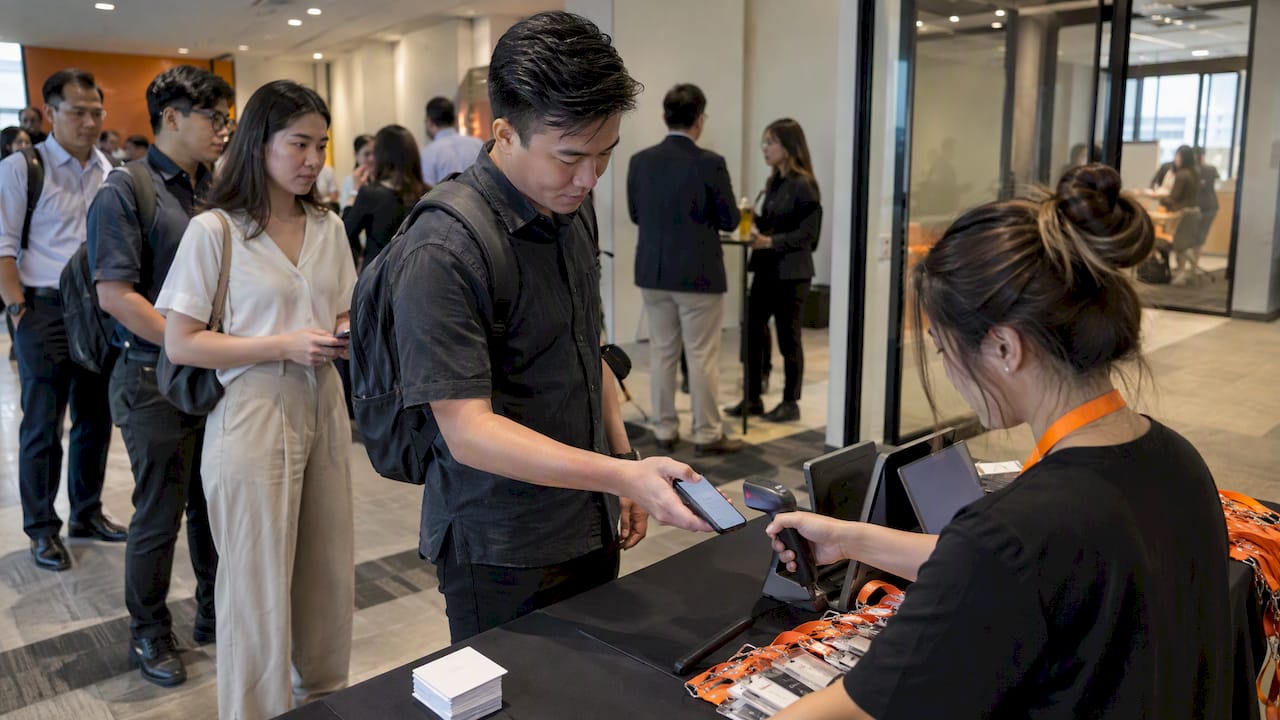
For most Singapore SME organisers, we believe FlowLab’s EventFlow family is the best event software choice, because it covers registration, attendance and on-site queues. Organisations such as NUS publish how they collect attendee data, and your software should make that same discipline easy. Here is how we reach that view.
TL;DR:
- Require a mandatory consent checkbox in registration, retain each attendee’s choice against their record, and confirm that deletion requests can be completed.
- Test offline scanning at the actual venue, verify scans sync after connectivity returns, and keep a printed guest list as a manual fallback.
- Compare annual costs across setup, subscriptions, transaction fees, hardware, support, customization, and data handling rather than judging vendors by subscription price alone.
- Pilot registration, payment, and consent at a small event, then test scanners and offline mode at the venue before your main event.
- EventNook’s EmTechAsia 2019 case used QR tickets, venue badge printing, and live tracking, with average peak waits below one minute.
Table of Contents
- How do EventFlow, PresenceFlow and QueueFlow cover your event job?
- What should you check when choosing event software in Singapore?
- What do registration, check-in, engagement and reporting actually mean?
- What does the PDPA mean for your event registration workflow?
- How do you go from selection to your first live event?
- What do Singapore event teams say about using event software?
- What does event software really cost to own?
- Should you choose local or international event software?
- What support and training can Singapore SMEs expect?
- How long does it take to choose and roll out event software?
- Why do we recommend a workflow-first approach to event software?
- What can FlowLab do for your next Singapore event?
- FAQ
- Sources
How do EventFlow, PresenceFlow and QueueFlow cover your event job?
Most event organisers in Singapore do not need a dozen disconnected tools. You need guests to register, arrive, be counted and be looked after, with every step respecting consent. We built products around that chain, and each handles a stretch of it.
EventFlow is our answer to “from guest arrival to live event visibility.” It handles registration, QR check-in, badge printing and a live view of who has turned up. PresenceFlow is for “attendance that is simple to record and easy to see.” It suits events where the headcount matters as much as the ticket, such as training sessions, recurring workshops and multi-day programmes. QueueFlow is there to “keep every queue moving and keep everyone informed,” which matters at registration desks, product demos and busy exhibition stands.
Together they fit small in-person meetings right up to mid-size conferences. Deployment details can be discussed with FlowLab. The essential features depend on your event workflow. The pricing shape is a setup fee plus a recurring plan, and we confirm the exact figures during a scoped conversation rather than guessing in an article. Ask how attendee consent is handled in the registration workflow.
To see how this plays out, picture some common events:
- Product launch: EventFlow supports event registration and guest check-in, while QueueFlow can help manage the arrival line.
- Workshop or training day: PresenceFlow helps record attendance, which can support follow-up and reporting.
- Conference: EventFlow supports registration and guest check-in, PresenceFlow helps with attendance, and QueueFlow can help manage busy points.
A real-world benchmark shows why smooth check-in deserves this much attention. EventNook reports that its EmTechAsia 2019 registration used QR ticketing, on-site badge printing and live attendance tracking, with average waiting times under one minute at peak. That is the standard to measure any tool against, ours included.
Pro Tip: During any trial, submit a test registration with the consent box unticked, then ticked, and ask the vendor to show you where each record is stored and how you would pull it up for a deletion request.
What should you check when choosing event software in Singapore?
A good checklist keeps demos honest. Vendors are happy to show a polished dashboard, so the questions you ask decide what you learn. Take these five areas into every conversation, in this order, and write down the answers.
- Registration and payment. Confirm that you can set the fields you actually need, that a mandatory PDPA consent checkbox can sit in the form, and that payment works with the gateways your attendees use. Ask about invoicing if corporate buyers need it, including InvoiceNow where relevant to your clients. If you want to understand alternative payment flows, a partner guide on QR code payments explains how QR-based checkout works in practice.
- Check-in and badge workflows. Ask how guests are scanned, what happens when the venue Wi-Fi drops, and which badge printers are supported. A tool that only works online is a risk in basement ballrooms and exhibition halls.
- Data controls and hosting. Ask where data is stored, which export formats you get, who can see which records, and how long data is kept. Role-based access matters when volunteers and agency staff touch the same list.
- Integrations and reporting. Check what flows out to your CRM, your accounting package and any payroll or claims process. Post-event exports are what turn a guest list into a marketing asset.
- Support and on-site services. Ask whether support is local, whether you can rent scanners and printers, and what response times apply on the day of an event.
Keep a simple scorecard. Mark each vendor as meeting, partly meeting or missing every point. A tool that scores well on features but cannot show you consent records is not ready for a Singapore audience.
If you want a wider view of the market before you shortlist, our own write-up on event registration software for four event types is a useful companion. International platforms are also worth a look as a benchmark. For example, Capterra Singapore lists Eventbrite with a 4.6 overall rating, noting quick setup and built-in payment handling, which is the sort of baseline any shortlist should be compared against.
What do registration, check-in, engagement and reporting actually mean?
Feature names sound alike across vendors, so it helps to know what each one changes on the day.
Registration logic is where most problems start. Conditional fields let you ask a dietary question only of people attending the dinner. Group bookings let one person register a team. Promo codes and refund rules need to match your commercial terms. The PDPA point is simple: consent should be captured inline, in the same form, so it is never an afterthought.
Check-in methods each trade speed against cost and complexity. Kiosk printing is fast for large crowds but needs hardware. Mobile scanning is cheap and flexible but depends on staff phones. Wristband printing suits multi-day events. A manual list is your last fallback, and it should always exist. For venues with weak connectivity, offline sync means scans are stored on the device and uploaded when the connection returns.
Engagement features such as session schedules, push messages, matchmaking and live polls matter most at conferences with parallel tracks. For a short client briefing, they are usually clutter.
Reporting is what you take away afterwards:
- Real-time attendance dashboards show who is in the room, so you can adjust catering and staffing mid-event.
- Post-event exports feed your marketing follow-up, subject to the consent each person gave.
- Clean attendance records support payroll or claims reconciliation when staff or contractors are involved.
Choose the features your event genuinely uses. Paying for matchmaking at a small workshop may be an avoidable cost.
What does the PDPA mean for your event registration workflow?
The Personal Data Protection Act shapes how you collect attendee details, and your software should make compliance routine instead of a manual chore. Practitioner guidance on PDPA event management states that organisers must obtain explicit consent for collecting, using and disclosing attendee data, build consent disclosures into registration, and appoint a Data Protection Officer for larger, regulated events.
Under the PDPA, explicit consent is required for collecting, using and disclosing attendee data, and failing to build it into registration can cause regulatory problems for government-linked or corporate conferences.
Use this as a demo checklist:
- Explicit consent: the form shows what you collect and why, and each attendee’s consent is stored against their record.
- Minimisation and retention: you can set how long data is kept and delete it on request. The NUS personal data guidance points the same way, with consent checkboxes in online forms, configurable retention and clear processor agreements.
- Security: encryption in transit and at rest, role-based access and, where possible, pseudonymisation. Public examples such as the Singapore International Water Week privacy statement describe encryption, pseudonymisation and strictly instructed third parties.
- Organisational steps: name a DPO or a responsible contact, and document every third-party processor, including your payment provider and any badge-printing partner. NUS Enterprise shows what a clear notice looks like, including a named contact for data queries.
- Operational risk: if you cannot show consent records, an audit can delay events tied to government or corporate clients.
How do you go from selection to your first live event?
Move in short, ordered steps so no decision is rushed into the week before the event.
- Write a brief. List your must-have features, event sizes, payment needs and consent requirements. Hand the same brief to every vendor.
- Pilot on a small event. Use an internal workshop or a low-stakes meetup to test registration, payment and recorded consent end to end.
- Prepare the venue. Test scanners, printers and offline mode in the actual space, and print a manual guest list as a fallback.
- Connect your exports. Send a sample file to your CRM and accounting tools, then confirm how retention and deletion work.
- Train staff once, properly. Run a single walkthrough with a go-live checklist covering opening time, scanner pairing, badge stock and who to call.
Pro Tip: Ask a colleague who has never seen the system to check in some fake guests without help. Wherever they hesitate is where your queue will form on the day.
What do Singapore event teams say about using event software?
We have no customer quotes we are able to publish here, and we will not invent any. What we can point to are public, checkable examples of how Singapore event organisers describe their own data handling and operations.
The EmTechAsia 2019 account mentioned earlier is the clearest operational case: a large conference run with QR ticketing, on-site badge printing and live attendance tracking, with average waits under one minute at peak. It shows what well-run check-in looks like.
On the data side, organisers such as Campus Game Fest state that they collect personal data for registration, communication and marketing, and protect it with encryption, secure storage and access controls to comply with the PDPA. That is a practical template for what attendees now expect to read before they sign up.
If you would like to hear how an SME like yours might set up EventFlow, our fit review is the quickest route. We map your event to a ready-made module first, so any story we tell you is about your workflow rather than a generic brochure.
What does event software really cost to own?
The subscription price is only part of the bill. When you compare vendors, add up everything you would pay across a year of events.
- Setup: one-off fees for configuring forms, branding and integrations.
- Recurring plan: monthly or annual fees, which may depend on event size or attendee volume.
- Transaction fees: per-ticket or payment processing charges, which can add up on paid events.
- Hardware: scanners, badge printers, wristband stock and spare batteries, whether bought or rented.
- Support and training: whether on-site support or training sessions are included or billed separately.
- Customisation: changes beyond the standard product, such as a special form or a custom report.
- Data handling: export charges, storage limits and deletion requests.
Ask every vendor to quote a single sample event with the same attendee numbers, and put the totals side by side. At FlowLab, we scope a project before development so you see the cost direction early, and we state prices only once the scope is clear. A ready-made module adapted to your workflow may cost less than a larger subscription with features you will never switch on.
Should you choose local or international event software?
Both can work, and the right choice depends on your event and your tolerance for fixing gaps yourself.
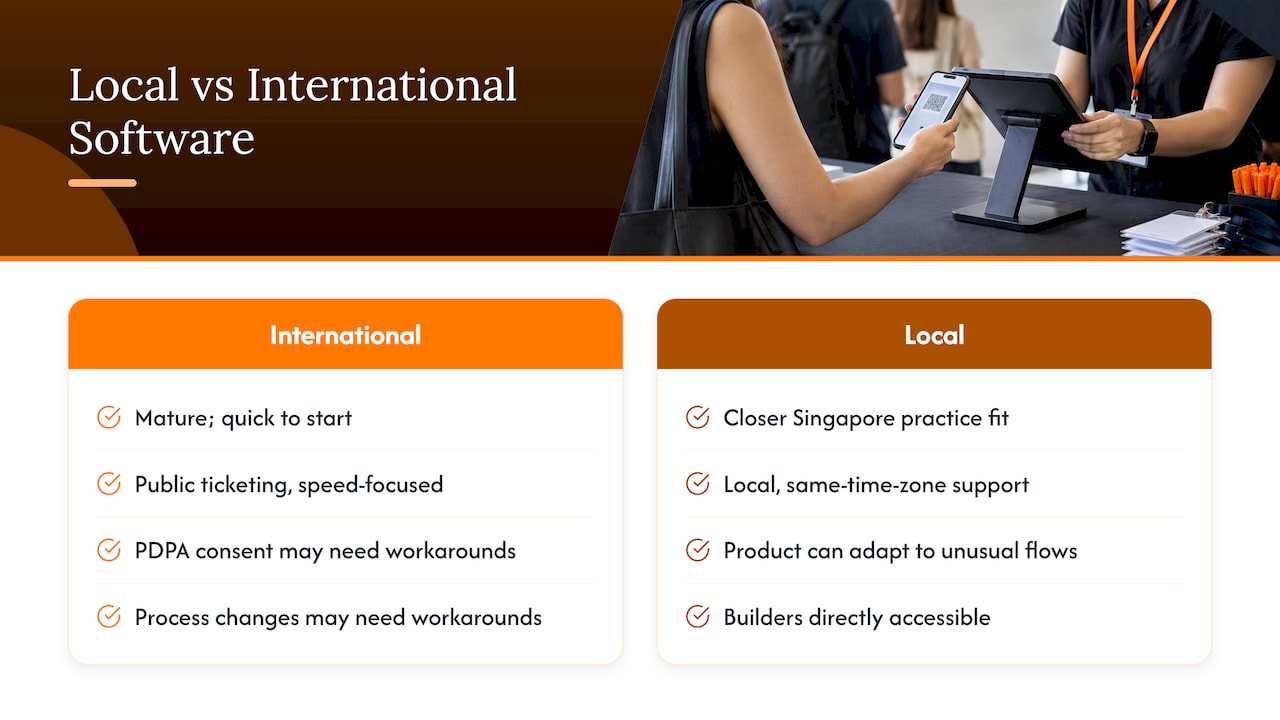
International platforms tend to be mature and quick to start. Eventbrite, for instance, is available in Singapore and commonly used for ticketing, as the Capterra Singapore listing notes. They are strong for public, ticketed events where speed matters most. Where they can fall short is local fit: PDPA-specific consent workflows, local support hours and adaptations for your own process may need workarounds.
Locally developed software usually offers closer alignment with Singapore practice and people you can meet or call in your own time zone. It can also be adapted. If your event has an unusual flow, such as staged arrival for VIPs or linked attendance for training claims, a local team can often change the product rather than ask you to change your event.
Contracts matter too. Terms for events may require participants to create accounts or configure software, and they are governed by Singapore law, as SPH Media’s events terms illustrate. Read the vendor’s terms for the same clarity, especially around data and liability.
Our view is straightforward: for SME organisers who want registration, attendance and queues in one setup and who value direct access to the builders, a local, adaptable product is the practical choice.
What support and training can Singapore SMEs expect?
Software is only as good as the help you get at 8 a.m. on event day. Before you sign, ask what support actually looks like.
Start with availability. Is support offered in Singapore working hours, and is there a way to reach someone during an evening or weekend event? Ask how quickly issues are acknowledged, and whether on-site help or device rental is available for larger events.
Next, look at onboarding. A single hands-on walkthrough for your team, plus a printed go-live checklist, usually beats a library of video tutorials. Ask whether training covers the specific tasks your staff will do: scanning, reprinting a badge, handling a walk-in and exporting the guest list.
Finally, ask about change requests. SMEs often discover mid-project that a form needs one more field or a report needs a different layout. Our approach is to talk through your workflow in plain language, with no technical brief required, and to keep scope and cost clear before any work begins. Confidentiality is respected throughout, so you can share how your events really run.
How long does it take to choose and roll out event software?
A realistic plan runs in stages, and the timing depends on how complex your event is and how quickly your team can decide.
- Define needs: a few days to write your two-page brief and agree must-haves.
- Shortlist and demos: about a week or two to see vendors, ask the checklist questions and compare total costs.
- Pilot: one small event, ideally several weeks before your main one, so you have time to fix anything the pilot uncovers.
- Configuration and integration: forms, branding, payment and exports, often alongside the pilot.
- Venue test and training: the final stage, scheduled for the days before the live event.
Work backwards from your event date. If your conference is coming up, make the decision early enough to leave time for a pilot and a calm rehearsal. If you are short on time, a ready-made module such as EventFlow can be configured faster than a bespoke build, and we will tell you plainly whether that route fits.
Why do we recommend a workflow-first approach to event software?
Most overspending on event software comes from buying features before understanding the job. A system with matchmaking, a mobile app and numerous report types sounds impressive until your event turns out to be a short client briefing with a modest number of guests.
That is why we start every conversation with your workflow, not a product demo. Our complimentary app fit review looks at how your events actually run, and then we recommend the simplest suitable route: a ready-made product, an adapted one, or a small custom build. The cheapest option is frequently a ready-made module adjusted to fit, rather than a subscription sized for a much bigger organisation.
My own view is that the market overrates feature lists and underrates fit. A good event software choice is one your team can use correctly under pressure, with a consent record behind every name. Everything else is decoration. If you are unsure which route suits you, we are happy to run a no-obligation fit review and give you a clear view of scope and likely cost before you commit.
— Ronald
What can FlowLab do for your next Singapore event?
We built these products to take the guesswork out of event day, and we will tell you straight which one fits.
- EventFlow: registration, QR check-in, badge printing and live event visibility, so guests arrive smoothly and you can see the room.
- PresenceFlow: attendance that is simple to record and easy to see, ideal for sessions, training and recurring programmes.
- QueueFlow: keeps every queue moving and keeps everyone informed at desks, demos and service points.
The next step is our complimentary app fit review. You describe how your events run, we map that to a ready-made product, an adapted version or a custom build, and we give you a clear scope and early cost direction before any development starts. There is no pressure to commit, and your information stays confidential. If you would rather see how it all fits together, browse our app development services for Singapore SMEs, or get in touch through FlowLab to request a fit review or demo. We also build tools such as POSFlow, PriceFlow and LeadsFlow if your event workflow reaches into sales and leads.
FAQ
What is the best event software for Singapore SMEs?
For most Singapore SMEs, we recommend EventFlow with PresenceFlow and QueueFlow, because registration, attendance and queues are handled together with PDPA consent built in. The right choice still depends on your event size and workflow, which a fit review can confirm.
Does event registration software need to be PDPA compliant?
Yes. Practitioner guidance says organisers need explicit attendee consent for collecting, using and disclosing personal data, built into the registration workflow. Check that consent is stored per attendee and that data can be deleted on request.
How do I choose event management software in Singapore?
Write a short brief, then compare vendors on registration, payment, check-in, data controls, integrations and support. Always run a pilot on a small event and compare the total cost across a year, not only the headline subscription.
Can event check-in work without internet at the venue?
It can, if the software supports offline mode, where scans are stored on the device and synced once the connection returns. Test this at your actual venue before the event, and keep a printed guest list as a manual fallback.
Sources
- Complyhq
- Personal Data Protection Notice – NUS Enterprise
- Success Story of EmTechAsia Conference Registration | EventNook Blog