
Multi-tenant software serves many customers from one shared application and infrastructure, with each customer’s data kept logically apart. Single-tenant software gives each customer its own dedicated instance. For most Singapore SMEs, multi-tenant is the cheaper and simpler starting point, and single-tenant is worth paying for only when you have a specific reason: strict data separation, heavy customisation or a contract that demands it.
That is the short answer. The rest of this guide explains the trade-offs in plain terms, where the middle options sit, and how to decide without a technical brief.
TL;DR
- Multi-tenant means shared software and infrastructure, separate data. It is usually cheaper, updated automatically and quicker to start.
- Single-tenant means a dedicated instance per customer. It gives more control and isolation, but costs more to run and maintain.
- Neither model is automatically secure or insecure. What protects your data is access control, encryption, monitoring and clear contracts.
- Many good systems sit in between: shared application, separate database or schema per customer.
- Start from your workflow and the data you hold, then pick the simplest suitable setup. Architecture should follow the need, not the other way round.
Table of Contents
- What “tenant” actually means
- Multi-tenant vs single-tenant at a glance
- Where multi-tenant wins
- Where single-tenant wins
- Security: the claim that needs care
- Singapore: what the PDPA means for your choice
- It is not a binary choice
- The hidden cost of multi-tenant: running it well
- Which one fits your business? A five-question check
- A worked example
- Our perspective
- Cost: what to expect and what to ask
- When custom beats shared
- How FlowLab can help
- FAQ
- Sources
What “tenant” actually means
A tenant is one customer of a software system: your company, in the case of a business app. Think of an office building. Everyone shares the lift, the power and the security desk, but each company has its own locked floor. That is multi-tenant. Single-tenant is closer to owning a separate building.
In software terms:
- Multi-tenant: one running application serves many tenants. Each tenant sees only its own data, its own users and its own settings.
- Single-tenant: each tenant gets its own copy of the application and usually its own database and server resources.
Most software-as-a-service products you already use, such as accounting tools, booking systems and CRMs, are multi-tenant. One practitioner discussion on Reddit puts it bluntly: a full stack per customer is rare in SaaS and tends to appear at enterprise level. That matches what we see: an SME rarely needs a private stack, but sometimes needs one slice of it kept separate.
Multi-tenant vs single-tenant at a glance
| Factor | Multi-tenant | Single-tenant |
|---|---|---|
| Cost to start | Lower, as infrastructure is shared | Higher, as you carry dedicated resources |
| Running cost | Spread across tenants | Carried by you alone |
| Updates | Rolled out once for everyone | Scheduled per customer, often slower |
| Customisation | Limited to settings and configuration, unless designed for more | Deep changes are possible |
| Data isolation | Logical (rules and boundaries in software) | Physical or near-physical |
| Performance | Can be affected by busy neighbours if poorly designed | Predictable, as resources are yours |
| Setup speed | Fast | Slower |
| Best for | Standard workflows, small teams, tight budgets | Regulated data, unusual workflows, contractual isolation |
A general industry view, repeated in older vendor commentary such as this SAP community post, is that a single-tenant system generally costs more than a multi-tenant one. The reason is simple: you are paying for resources that sit idle some of the time.
Where multi-tenant wins
Lower cost and faster start
Shared infrastructure means the provider’s costs are divided between many customers. For an SME with ten or thirty staff, that is usually the difference between a sensible monthly plan and a project that never gets approved.
Updates without effort
In a multi-tenant product, a fix or improvement is released once and everyone gets it. You do not schedule downtime or chase a vendor for a patch. For a business without an IT team, this matters more than any architecture diagram.
Easier to scale
Adding a new branch, outlet or team is normally a configuration change, not a new deployment. If your business is growing or seasonal, a shared platform absorbs that without a new infrastructure bill.
Where single-tenant wins
Stronger separation
With a dedicated instance, a fault, a heavy workload or a misconfiguration in another customer’s account cannot touch yours. If you hold sensitive records, such as medical, financial or legal client data, that separation is easy to explain to your own customers and auditors.
Deeper customisation
Shared platforms have to keep every tenant on the same code. If your workflow is unusual, a dedicated instance lets the software bend to your process instead of the other way round.
Predictable performance
Because nobody else uses your resources, you control peak load. A shop running a promotion or an event with a registration rush is not competing with another tenant’s busy hour.
Control over change timing
Some businesses need to test updates before they go live, for example when the app is tied into payroll or billing. Single-tenant lets you choose when to upgrade.
Security: the claim that needs care
The most common assumption is that single-tenant equals secure and multi-tenant equals risky. It is not that simple.
Security guidance we have reviewed stresses that a dedicated instance is no shortcut: it can give a false sense of safety if identity and access management, encryption and vulnerability monitoring are weak. That point is made in Swiss federal guidance on cloud use (see the Swiss Federal Chancellery), and the principle holds anywhere: what matters is whether you can prove how data is controlled, not only where it sits.
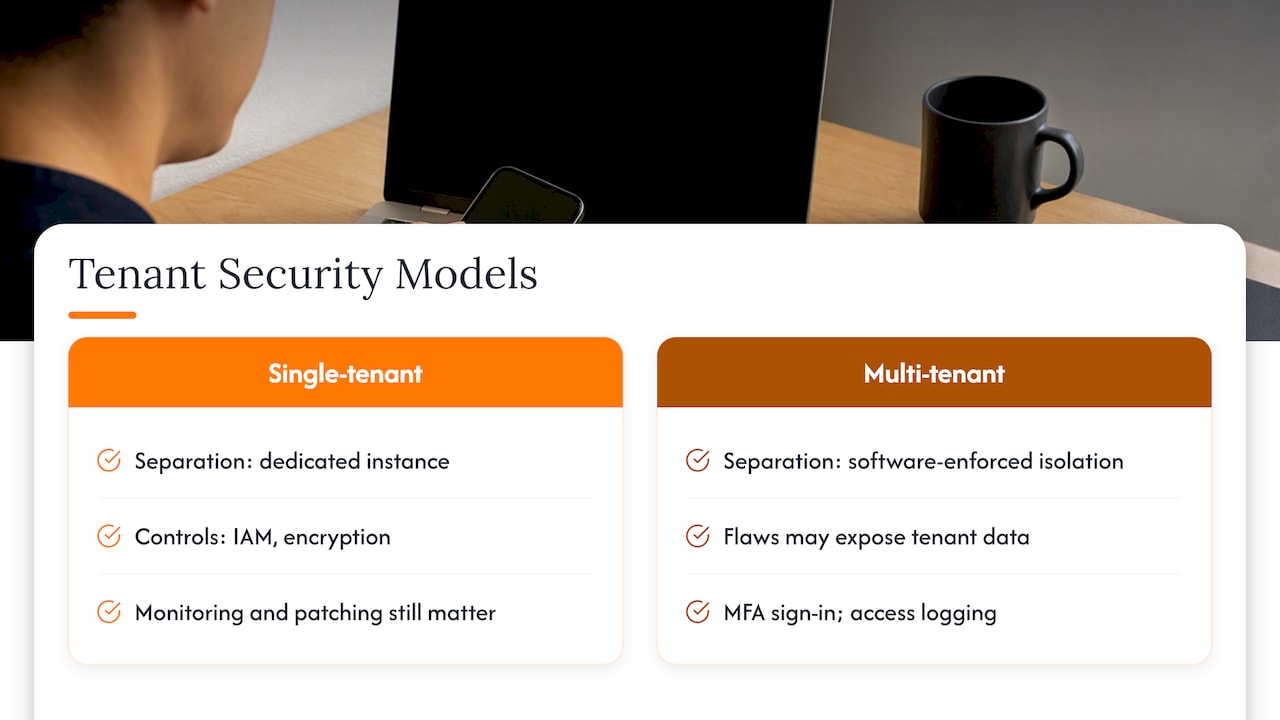
In practice, most real-world breaches at small firms come from weak passwords, shared logins, over-broad access rights and unpatched software. A well-run multi-tenant platform with enforced multi-factor sign-in is safer than a neglected private server. If password habits are your weak point, our guide to single sign-on for SMEs with FIDO2 multi-factor authentication is a better first step than changing architecture.
One caveat on shared platforms: isolation is enforced by software. If that software has a flaw, one tenant could see another’s data. This is why it is fair to ask any provider how tenant separation is tested and how access is logged.
Singapore: what the PDPA means for your choice
Singapore’s Personal Data Protection Act does not tell you to use one tenancy model or the other. It puts duties on organisations that collect and use personal data, and your obligations remain even when a cloud provider processes the data for you. The Personal Data Protection Commission has published guidance on personal data protection and cloud services, which is worth reading before you sign with any provider.
What this means for your decision:
- Ask who processes what. Your contract with a software provider should say how personal data is handled, secured and deleted.
- Check access controls. Who can see customer or staff records, and is that logged?
- Know where data is stored. Some customers, especially in finance and healthcare, will ask for this in their own vendor questionnaires.
- Plan for incidents. Know who tells whom if something goes wrong.
Switzerland takes a similar line, as the Federal Data Protection Act is about how you control access to data and who acts as processor, not whether hardware is shared. We mention it only as a comparison: the PDPA is the law that applies to you in Singapore, and for specific legal questions you should speak to a lawyer or your data protection officer.
It is not a binary choice
Most articles present two boxes. In reality there is a range of isolation levels, and the middle is where many SMEs end up.
- Shared database, row-level separation. All tenants sit in the same tables, and every record is tagged with its owner. Cheapest and simplest, but separation depends on the application code being right every time.
- Shared database server, separate schema per tenant. Each customer has its own set of tables inside a shared database. A stronger boundary that is easier to explain to an auditor.
- Separate database or instance per tenant. Full separation of data, with a higher running cost.
One Swiss managed database provider, for example, recommends a separate PostgreSQL instance per major customer with schema isolation for the tenants underneath when handling regulated data, and is candid that this is not free. For an SME that needs a defensible boundary without the cost of a full private environment, schema or database separation is often the sensible middle.
Large cloud platforms work the same way. Swisscom, for instance, describes its enterprise cloud as multi-tenant, with shared physical resources that are logically isolated so that tenants never share data. Shared does not have to mean exposed.
The hidden cost of multi-tenant: running it well
Multi-tenant is cheaper for the end customer, but harder for whoever builds and runs it. Practitioners point out that managing cloud applications is markedly different from traditional on-premise systems, and a shared platform needs automated deployment and central monitoring to stay healthy.
This matters if you are thinking of building your own multi-tenant product. A business without that operational discipline can find the overhead outweighs the savings. It is also why, if you are buying rather than building, you should ask the provider who monitors the system, who is on call and what happens when something fails.
Which one fits your business? A five-question check
Work through these in order. Stop at the first clear answer.
- Does your workflow match a standard pattern? Point of sale, queueing, event registration, lead tracking and attendance are well understood. A shared product covers these well, usually at the lowest entry cost.
- Do you hold sensitive records that a customer or regulator may ask you to keep separated? If yes, ask for schema, database or instance isolation, and get it in writing.
- Is your process genuinely unusual? If you would need to change how you work to fit the software, consider an adapted or custom build.
- Do you need control over when updates happen? If an unplanned change could disrupt payroll, billing or compliance reporting, a dedicated setup is easier to live with.
- Do you have someone to manage it? If not, choose a managed service, whether shared or dedicated, so that patching, backups and monitoring are not left to chance.
For most SMEs, the answers point to a shared product, possibly adapted, with good access control. A smaller group needs a dedicated or semi-dedicated setup. Very few need a fully private stack from day one.
A worked example
Take a 20-person clinic group in Singapore that wants appointment queues and attendance tracking across three sites.
- Queues and check-in are standard. A shared, multi-tenant queue product is likely enough.
- Patient-related notes are sensitive. Here the clinic should ask about data isolation, access logging and where records are stored, and may want a separate database for that part.
- Staff attendance is low risk and fits a shared product.
The result is a mixed answer: shared for the routine pieces, a more isolated setup only where the data justifies it. This is cheaper than putting everything on a dedicated stack, and safer than putting everything in one shared pool without thought.
Our perspective
We are often asked to recommend an architecture before we have asked about the business. We think that is the wrong order.
At FlowLab we start with the workflow: what your team does each day, where time is lost, what data is touched, and who needs to see it. Only then do we look at the technical options. Our approach is to recommend a ready-made product first, an adapted version second and a bespoke build last, because the simplest suitable solution is almost always the most cost-conscious one.
On tenancy specifically, our view is this:
- Do not pay for isolation you cannot name a reason for. “Dedicated feels safer” is not a reason.
- Do not accept shared infrastructure without asking how separation, access and logging work.
- Spend your first effort on sign-in, permissions and backups. They protect you under either model.
- Ask for a clear scope and a cost direction before development begins, and keep the option to start small.
We also treat what you tell us as confidential, including the details of your processes and the data involved.
— Ronald
Cost: what to expect and what to ask
The cost gap between the two models is real, but the useful question is the total cost over three to five years, not the monthly fee. Shared plans are cheaper to start, while dedicated builds usually carry larger upfront and ongoing costs. Our comparison of subscription vs perpetual software over three to five years shows how to run those numbers for your own workflow.
Before you commit to any provider, ask:
- What exactly is included in the monthly or project fee?
- What does extra customisation cost, and how is it scoped?
- Who handles backups, updates and security monitoring?
- Can I export my data if I leave?
- What isolation is there between my data and other customers’ data?
- How are users authenticated, and is multi-factor sign-in supported?
If an answer is vague, treat that as information.
When custom beats shared
Shared platforms are built for the average customer. If you find yourself stacking workarounds, such as spreadsheets, automation tools charging per task and manual copy-paste between systems, the platform may not fit. Our write-ups on custom CRM vs off-the-shelf and when Zapier or Make needs a custom app walk through the signs that it is time to consider something built around your process.
The opposite error is also common: commissioning a custom build when a ready-made product would do. That is why a workflow review comes before any quote.
How FlowLab can help
If you are weighing shared against dedicated for a real project, we offer a complimentary app fit review. We look at your workflow, tell you whether a ready product, an adapted one or a custom build is the simplest suitable route, and give you a cost direction before development starts. There is no technical brief to write and no pressure to commit.
You can try our product demos first: see the product demos ↗, or read how we approach custom software development for Singapore SMEs ↗. If queues are your bottleneck, have a look at QueueFlow ↗.
FAQ
Is SaaS single-tenant or multi-tenant?
Most SaaS products are multi-tenant, because sharing infrastructure keeps prices low and updates simple. Some providers offer single-tenant or dedicated hosting as a premium option, typically for larger or regulated customers. Always check the provider’s documentation rather than assuming.
Is single-tenant always more secure?
No. It gives stronger separation from other customers, but security still depends on access control, encryption, patching and monitoring. A poorly managed dedicated server can be less safe than a well-run shared platform.
Does multi-tenant breach the PDPA?
The PDPA does not prohibit shared infrastructure. It expects you to protect the personal data you are responsible for, including when a provider handles it for you. Check your contract and the provider’s controls, and take legal advice if your data is sensitive or your sector has extra rules.
Can I start multi-tenant and move to single-tenant later?
Often yes, but it is easier if you plan for it. Ask whether data can be exported in a standard format and whether the provider offers a dedicated or separate-database option later. Moving between models is a migration project, so scope and cost it before you need it.
What is the middle option between the two?
A shared application with a separate schema or database per customer. It gives a clearer boundary than row-level separation, at a lower cost than a full private instance. Many SMEs find this a practical balance.
Sources
- Reddit r/SaaS: Multi tenancy or single tenancy?
- SAP Community: Multi-tenant vs Single-tenant Architecture (SaaS)
- Swiss Federal Chancellery (bk.admin.ch)
- JD Supra: Singapore issues guidelines on personal data protection and cloud services
- EDÖB: Cloud-Computing
- Managed PostgreSQL: Multi-tenancy in PostgreSQL
- Swisscom: Private cloud for companies in Switzerland
- Swisscom: Cloud consulting for your cloud initiative