
A test environment is a controlled copy of your system where you try changes safely. Production is the live system your staff and customers actually use. The difference matters because a mistake in testing costs you an hour, while the same mistake in production can cost you orders, data and trust.
This guide is for Singapore business owners and managers who are commissioning or running an app, and who keep hearing words like “staging” and “UAT” without a plain explanation. We cover what each environment is for, where staging and UAT sit, whether you can ever test in production, and what to ask your developer before anything goes live.
TL;DR
- A test environment is where changes are tried without affecting live users. Production is where real users, real data and real money are involved.
- Staging is the last rehearsal before production and should mirror it as closely as possible. UAT is where your own people confirm the app does what the business needs.
- Keep real customer data out of test environments. Singapore’s PDPC advises using synthetic data instead.
- Keep environments as similar as possible, and keep passwords and keys out of the code.
- Ask for a written release checklist and a rollback plan before any change goes live.
Table of Contents
- What each environment is for
- Test environment vs production at a glance
- Where staging and UAT fit
- Can you test in production?
- Test data: keep real customer records out
- Configuration and secrets: same code, different settings
- A release checklist before anything goes live
- Our perspective: simple setups beat impressive diagrams
- How we handle environments for SME projects
- FAQ
- Sources
What each environment is for
Most business apps run in at least three places, even if a small team never says so out loud.
Development is where the developer builds. It changes constantly and breaks often. You rarely need to see it.
Test is where changes are checked. The DHI engineering documentation describes a test environment as a controlled combination of hardware, software and network configurations that mimics production. It is used to verify behaviour, try new features, run regression, integration, performance and security tests, and find defects before release without affecting live users.
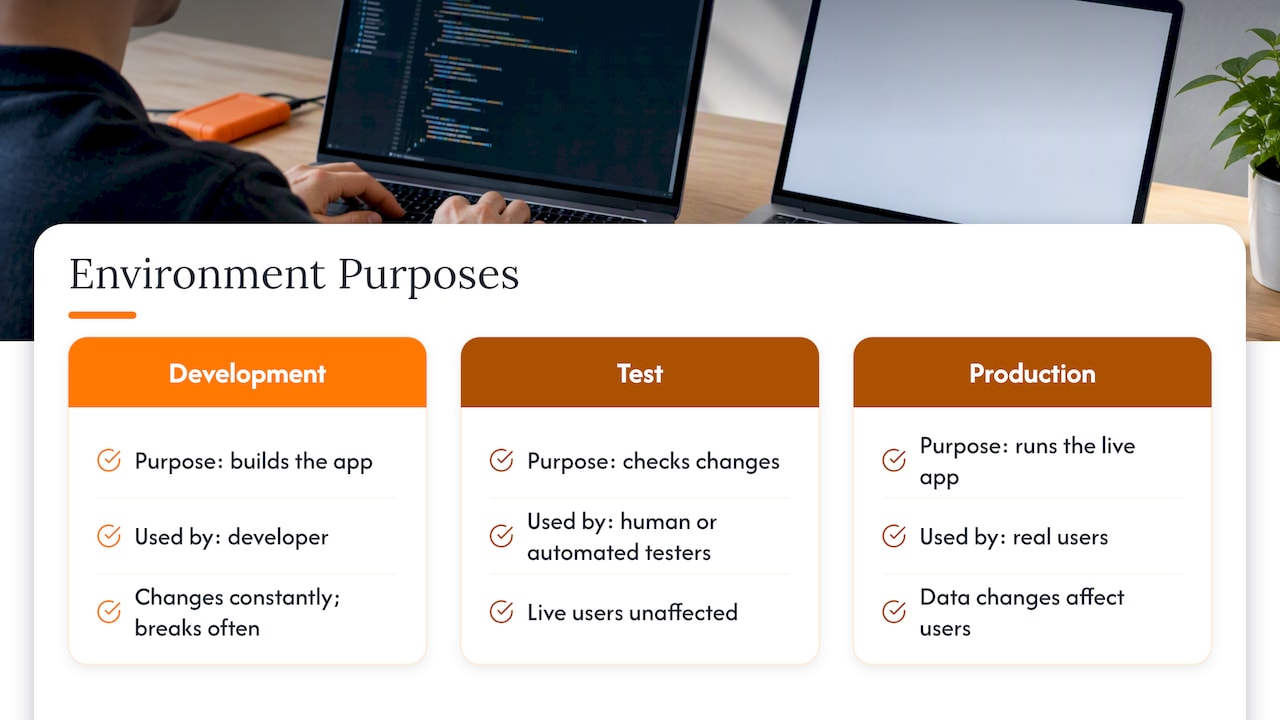
Production is the real thing. Microsoft’s guidance puts it simply: a test environment lets human or automated testers try new or updated code, while production is the environment users directly interact with.
The key point for an owner is consequence. Firebase’s documentation notes that, unlike other environments, changing or deleting production data directly affects users. In a test environment you can delete a table, break a payment screen or send a hundred bad queue tickets, and nobody outside the team notices.
Test environment vs production at a glance
| Test environment | Production | |
|---|---|---|
| Purpose | Find defects before release | Run the business |
| Users | Developers, testers, sometimes your staff | Customers and staff |
| Data | Synthetic or anonymised | Real, live records |
| Cost of a mistake | Low: fix and retry | High: lost orders, wrong records, downtime |
| Changes | Frequent, experimental | Controlled, planned, reversible |
| Integrations | Often sandboxed or switched off | Real payments, emails and messages |
| Access | Wider, but with test accounts only | Tight, by role |
The last two rows catch many small businesses out. A test copy that sends real emails to real customers, or charges a real card, is not really a test environment.
Where staging and UAT fit
People search for “staging vs production” and “UAT vs staging” because the words overlap. Here is the short version.
Staging: the final rehearsal
Microsoft describes staging as the final-testing environment immediately before production, and says it should mirror an actual production environment as accurately as possible. Singapore’s Government Technology Agency explains that staging supports functional, regression and performance testing with real integrations while keeping test activity and its load away from production resources.
The Association of Banks in Singapore asks for the same in its change management advisory: a testing environment that mirrors production as closely as possible, including configurations, interconnected systems and capacity. That standard is written for banks, but the logic applies to an SME with a point-of-sale or booking app. If staging is smaller, older or configured differently, a pass in staging proves less.
UAT: your people sign off
User acceptance testing is a different question. Staging asks, “Will this release behave technically as it will in production?” UAT asks, “Does this actually do what our business needs?” In Microsoft’s description, UAT lets end users or clients test and verify or accept the software before it moves to production.
GovTech’s Software Delivery Playbook describes a UAT environment as a production-like, safe space where business stakeholders evaluate whether new functionality meets business needs and is ready for production.
In practice:
- Staging is run mainly by the developer or technical team.
- UAT is run by you: the shop manager, the front-desk lead, the finance person who will use the app daily.
One environment can serve both purposes in a small project. What matters is that the two questions are both answered, by the right people, before go-live. If you want a ready structure for the second one, our SME UAT test plan gives you sections to paste into Word or Excel.
Why earlier acceptance is cheaper
GovTech’s guidance implies that acceptance works best when it is continuous rather than saved for the end, because earlier feedback catches usability and edge-case problems before the work becomes tightly coupled and expensive to change. Teams that want fewer late surprises often read about shipping features without endless rewrites for the same reason: the sooner real users see something, the cheaper the correction.
Can you test in production?
Sometimes, but it should be a decision, not an accident. The Association of Banks in Singapore’s Penetration Testing Guidelines list the risks of testing on live systems for financial institutions: compromised data integrity, exposure of confidential information, service outages and destructive effects. The guidelines recommend a risk assessment, and a production-like environment where the risks are significant. They also call for safeguards such as monitoring, backups, segmentation and limits on disruptive tests.
You are probably not a bank, but the same risks apply at smaller scale. A test order in your live POS skews the day’s sales report. A test registration in a live event system emails a real guest.
A sensible rule for an SME:
- Do functional and acceptance testing outside production. This includes anything that creates, edits or deletes records.
- Limit production checks to a short smoke test after release. Log in, open the main screen, confirm one safe read-only action works.
- If you must test live, agree it in writing. Name who does it, what records they will touch, how test entries are marked and how they are removed.
- Have a backup and a way back before any live change. Our guide to a data migration plan with a rehearsed rollback shows what that looks like.
The honest answer to “Can UAT be done in production?” is: it can, but you are then accepting the risks above, and you give up the safety that a separate environment buys you.
Test data: keep real customer records out
This is the part Singapore owners most often overlook. A test copy is usually less protected than production, yet teams are tempted to fill it with a copy of live customer data because it looks realistic.
The PDPC’s guide to data protection by design for ICT systems advises organisations to avoid loading production data into test environments because those environments are typically less secure, and recommends creating synthetic data instead. It also suggests mapping where personal data is stored and flows, using granular access controls, and removing test accounts after testing.
Good test data does not need to be real. Firebase’s documentation says development and test data should resemble production data without containing real users’ data, and should include representative records, corner cases and cases from past bugs. GovTech adds that realistic anonymised data in integration or end-to-end tests can increase coverage and reduce surprises with real-world data.
For a small business, that means asking your developer:
- Will you build test data from scratch, or copy ours?
- If anything is copied, how is it anonymised, and who can see it?
- Are test accounts removed after testing?
- Do email, SMS and payment integrations point to sandboxes in staging? Firebase notes that staging may disable side-effecting integrations such as email and should use anonymised or fake data.
We treat confidentiality as part of the job. Nothing about your customers should leave your control just because a build is being tested.
Configuration and secrets: same code, different settings
A healthy setup runs the same application in every environment. What changes is configuration: which database it talks to, which payment account it uses, which email service it calls.
GovTech’s Software Delivery Playbook recommends externalising configuration, including environment-specific database connections, API keys and service endpoints, rather than hard-coding sensitive values. The benefit is that operations can manage environment differences without code changes or redeployment, and secrets stay out of source code.
Microsoft also recommends keeping environments as similar as possible. Its warning is that configuration drift can cause data loss, slower deployments and failures, and that Infrastructure as Code can improve consistency.
Plain-language test for your developer: “If I ask you to rebuild the test environment tomorrow, how long would it take, and would it match production?” A confident, specific answer is a good sign.
A release checklist before anything goes live
Here is a practical list an SME can ask for before approving a release. It draws on the guidance above.
- Automated tests pass. Microsoft suggests requiring unit tests before code enters test, test-result gates that block failures, and designated reviewers for pull requests.
- Staging matches production. Same versions, same configuration pattern, similar capacity.
- Acceptance is signed off by a named person on your side, against written scenarios.
- Security and data-protection checks are done. The PDPC says testing should validate requirements and data-protection considerations, and recommends penetration testing and relevant security testing, including checking that data-protection measures work as intended.
- A backup exists and a rollback is written down. Know who decides to roll back, and how long it takes.
- The release time is agreed. Pick a quiet period for your business, not a Friday lunch rush.
- A short post-release check is planned, with a named person watching.
GovTech’s guidance on continuous delivery says the path to production should be exercised early and automated for repeatability, so integration issues surface before delivery deadlines. The aim is for a production release to become a repeatable non-event through rehearsal. Engineers exploring this often start with automating deployment workflows; as a business owner, you only need to know that rehearsed releases are calmer releases.
Our perspective: simple setups beat impressive diagrams
We meet many owners who were told they need four environments, a pipeline and a monitoring stack before their first app goes live. Sometimes that is true. Often it is not.
Our view is that the number of environments should follow the cost of a mistake. A small internal attendance tool used by ten people can run well with a test copy and a production copy, plus clear acceptance steps. A point-of-sale system handling live payments across several outlets deserves a proper staging stage that mirrors production.
Three things matter more than the count:
- Test with your real workflow, not just the developer’s script. Staff find the awkward cases: the refund after closing, the walk-in who is not on the list.
- Never use live customer data to make a test look realistic. Synthetic data is slower to prepare and far safer.
- Know your way back. A release you can reverse in minutes is worth more than ten extra test cases.
This is also why we start with your workflow and not with technology. Before we recommend anything, we look at what is going wrong in the day-to-day, then suggest the simplest suitable route: a ready product, an adapted one, or a custom build. The testing setup then scales to that choice, not to a template. If you are still deciding on the route, our five tests for build vs buy and our guide on prototype or MVP first are good places to start.
— Ronald
How we handle environments for SME projects
When you work with FlowLab, we explain in plain terms which environments your project needs and why, before development starts. That includes how test data will be handled, who signs off acceptance, and how a release can be reversed. Our free app fit review also gives you early cost direction, so you know what testing and release effort the chosen route involves.
If you want to see a working system before committing, you can try the complete queue journey in the QueueFlow demo ↗ or run a sample sale in the POSFlow demo ↗. To discuss a custom build, start from our custom software development service for Singapore SMEs ↗. A clear written brief also makes testing easier, since it defines what “working” means; our software brief template helps with that.
FAQ
What is the difference between a production environment and a test environment?
Production is the live system that customers and staff use, with real data and real consequences. A test environment is a controlled copy used to try changes and find defects without affecting live users. Anything that could break or delete records belongs in the test environment first.
What is the difference between staging and production?
Staging is the final rehearsal before release and should mirror production as closely as possible in versions, configuration and integrations. Production is where the release actually serves users. Staging should use fake or anonymised data, and may switch off side effects such as real emails.
What is the difference between UAT and staging?
Staging mainly checks that a release will behave technically as it will in production, and is usually run by the technical team. UAT is where your own staff confirm the app meets business needs and accept it. In small projects one environment can serve both, as long as both checks happen.
Can UAT be done in production?
It can, but you take on risks such as damaged data, exposed confidential information and outages. Singapore’s banking association lists these risks for production testing and recommends risk assessment and a production-like environment where risks are significant. For most SMEs, a separate environment with synthetic data is the safer choice.
Do small businesses really need a test environment?
If the app touches customers, payments, stock or personal data, yes. It does not need to be elaborate. A separate copy with fake data, a written acceptance step and a rollback plan covers most of the risk for a small system.
Sources
- Test Environment Strategy, DHI Developer Documentation
- Environments, Cloud Adoption Framework, Microsoft Learn
- Overview of environments, Firebase Documentation
- Opus Documentation, Singapore GovTech
- Advisory on IT Change Management Best Practices, Association of Banks in Singapore
- Penetration Testing Guidelines 2.0, Association of Banks in Singapore
- User Acceptance Testing, Software Delivery Playbook, GovTech
- Test Quality, Software Delivery Playbook, GovTech
- Design for Operations, Software Delivery Playbook, GovTech
- Continuous Delivery, Software Delivery Playbook, GovTech
- Guide to Data Protection by Design for ICT Systems, PDPC
- How do I ship AI features faster without endless rewrites, Crontent
- Agentic Workflows: A Practical Guide for Engineers