
Email automation for operations means your systems send the right message when something is recorded: an enquiry arrives, a booking is made, an invoice is paid. Nobody types it, nobody forgets it. For most Singapore SMEs the fastest route is to list the events your team already handles by hand, connect each to one message and one next step, and use a sending service that keeps those emails out of the spam folder. This guide shows how to do that, what the main sending services cost, and when a ready-made or tailored app is simpler than stitching tools together.
TL;DR
- Operational email is triggered by facts your systems record (a form, a booking, a payment, a status change), not by guesswork.
- Design the hand-off first: what must happen in your CRM, calendar or invoicing tool after the email goes out.
- Choose a sending service on domain authentication, delivery events and separate streams for operational and marketing mail, then compare the price.
- Test the unhappy paths (no-shows, duplicates, replies, stops) before you switch anything on.
- If you already run on several tools, a thin workflow layer or a small custom app often beats another subscription.
Table of Contents
- What email automation for operations actually covers
- Operational email versus marketing email
- Step 1: List the events, not the emails
- Step 2: Map the hand-off, not just the message
- Step 3: Pick the sending method
- Step 4: Build in the stop rules
- Step 5: Test before you trust it
- When an email service is enough, and when it is not
- Perspective: start from the workflow, not the tool
- Where our products already send operational messages
- Promo: a free app fit review
- A simple starting checklist
- FAQ
- Sources
What email automation for operations actually covers
Most articles on this topic are about marketing: welcome series, newsletters, abandoned carts. Operational email is different. It exists to move work along inside the business and between you and the people you serve.
Typical examples:
- A new enquiry arrives and the sender gets an acknowledgement while the right person gets an alert.
- A booking is confirmed, then reminded the day before.
- A quotation or invoice is issued, and a reminder follows if it stays unpaid.
- A manager is notified when a quote is above an agreed value.
- A visitor registers for an event and receives a confirmation and a reminder.
Singapore-based CRM vendor CARDDIO lists contact, lead and deal creation, quotations and invoices, event registrations and follow-ups falling due as common automation triggers. Zoho documents a similar idea in its billing tool: a workflow can send an email alert when a quote exceeds $10,000 and an in-app notice when an invoice becomes paid.
The common thread is that each message is tied to a recorded event. That is also what separates it from an autoresponder, which replies to anything in the same way. Guidance for small businesses makes the same point: notifications should be triggered by system-recorded facts such as form submissions, bookings, payments or status changes, not by someone’s judgement call.
Operational email versus marketing email
The distinction matters for two reasons: how you build it and what rules apply.
Order confirmations, password resets, account activations and booking notices are triggered by something the customer did. A Singapore marketing agency’s guide notes that such transactional emails fulfil an existing relationship and do not need marketing consent. Promotional content is another matter. If you add a discount banner or a cross-sell to a booking confirmation, you are drifting towards marketing, and the consent rules for marketing messages start to apply. The Personal Data Protection Commission publishes the current requirements on pdpc.gov.sg, and it is worth reading before you mix the two.
Our practical rule: keep operational emails short, factual and free of promotion. It protects you legally and it protects deliverability.
Step 1: List the events, not the emails
Do not begin by writing templates. Begin by walking through a normal week and writing down every moment where someone says “I need to tell them” or “I forgot to chase”.
For each moment, record four things:
- The trigger: what is recorded, and where (form, booking tool, POS, spreadsheet).
- The condition: which cases qualify (for example, unpaid after seven days).
- The action: who gets which message, and what else changes.
- The owner: the person responsible if the automation fails.
This mirrors how workflow guides describe the mechanics: a trigger as the starting event, conditions that filter who enters, and actions that are performed. A reliable example is: booking created (trigger), check whether it is unpaid (condition), send a reminder (action), with a log of what ran.
A useful first pass is to rank your list by two measures: how often the event happens, and how much it hurts when it is missed. Start at the top. Three well-built automations beat fifteen half-tested ones.
Step 2: Map the hand-off, not just the message
The most common mistake is to treat the email as the finish line. It is usually the middle.
An automation guide from MESA puts it plainly: effective operations automation depends on mapping the whole hand-off, meaning what work must follow the email. Their model of a complete workflow includes a filter so only relevant cases proceed, a sync step that updates other tools, and an approval step for high-value or sensitive actions.
In practice, ask of every email:
- Which record should change when this is sent (status, owner, due date)?
- Who is alerted if the customer replies, or does not reply?
- Which cases need a human to approve before anything leaves the building?
Consider an enquiry from your website. The visitor receives an acknowledgement. The enquiry is created in your lead list with an owner and a follow-up date. If nobody has touched it in two working days, the owner’s manager gets an alert. Only the first step is “email”; the value is in the other two.
If calendars are part of the hand-off, for example appointment reminders that must match a diary, a calendar integration workflow guide shows how to keep the booking record and the diary in agreement, which is what makes a reminder trustworthy.
Step 3: Pick the sending method
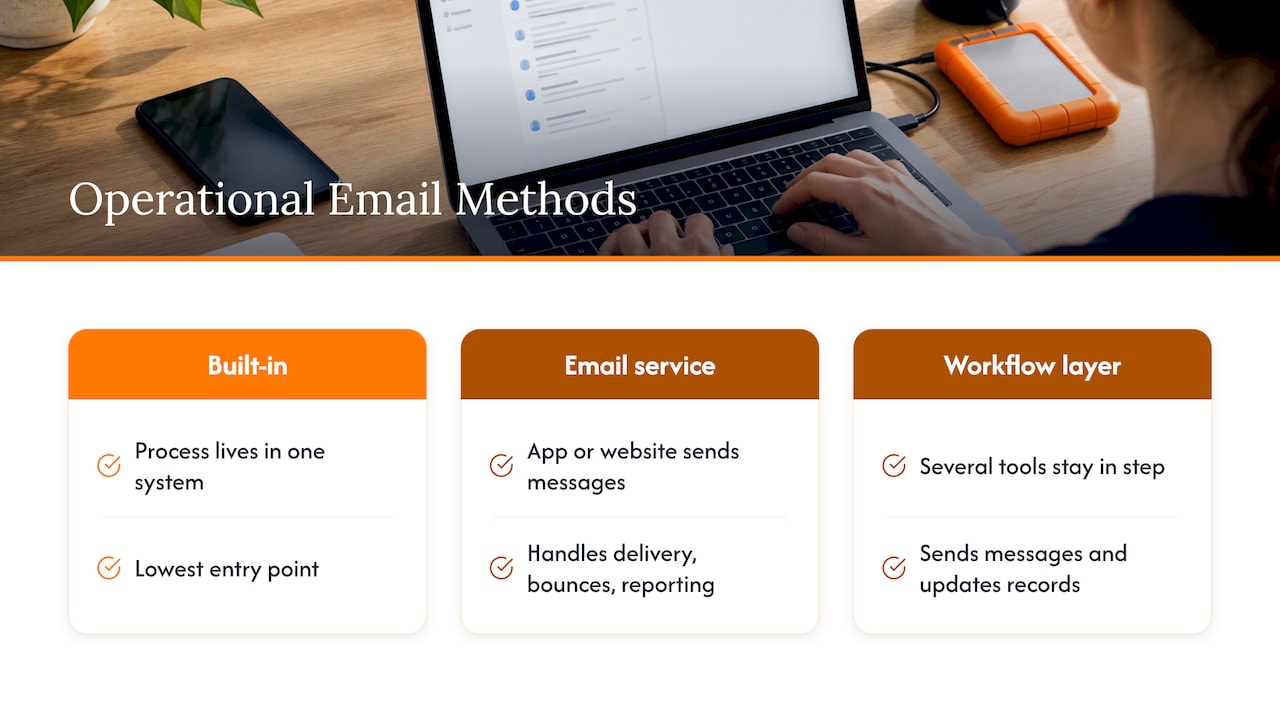
There are three broad ways to send operational email, and many SMEs end up using a mix.
Inside the tool you already use. CRMs, billing and booking tools often have built-in notifications. This is the lowest entry point and the right one when your process lives in one system.
A transactional email service. When your own app or website must send messages, a dedicated sending service handles delivery, bounces and reporting. It is normally connected by SMTP or API.
A workflow layer. Where several tools must stay in step, an automation platform or a small custom workflow sends messages and updates records across them. A guide on this approach describes it as connecting existing calendar, CRM, invoicing and messaging tools rather than replacing them. Our comparison of n8n and Zapier for SMEs covers the cost trade-offs between per-task pricing and a managed build.
What to check in a sending service
Price is the last filter, not the first. Look for:
- Domain authentication: support for SPF, DKIM and DMARC so mailbox providers trust your messages.
- Delivery events: signed webhooks for delivery, bounce and complaint events, and visible delivery status.
- Separate streams: the ability to keep operational mail apart from bulk marketing so a campaign problem does not hold back your invoices.
These criteria come from two deliverability guides: one on choosing a transactional email API and one on whether an email service provider affects deliverability for operational mail. Webhooks matter more than they sound: they let your system react to a bounce, for example by flagging a wrong address for a human to fix. A technical piece on using webhooks to process events automatically explains the pattern, where one system receives a signed event and acts without anyone checking a screen. The same idea applies to booking confirmations and order updates.
What the services cost
Published plans differ in shape, so compare against your realistic monthly volume. Figures below were listed on each provider’s page when we checked, and they can change, so confirm on the page before you decide.
| Provider | Published pricing | Notes |
|---|---|---|
| Sendune | $10 a month plus $0.0001 per email | Underlying AWS SES charges $0.0001 per email separately |
| Exabytes Singapore | From S$27.24 a month for 50,000 emails | SMTP and API integration, with analytics |
| Bird | Startup from $15 a month for 50,000 to 100,000 emails | No platform fees or per-seat charges listed |
A shop sending 3,000 operational emails a month will find that all three are inexpensive relative to staff time. The better question is whether the service gives you the delivery events and authentication above, and whether someone on your team, or your developer, can set it up properly.
Step 4: Build in the stop rules
The failures that annoy customers are rarely a missing email. They are an extra one: a payment reminder after payment, a second confirmation, a reminder for an appointment that was cancelled.
OWNIT’s small-business guidance warns that stop rules are easy to forget and are what prevent reminders going out after the customer has already acted. For each workflow, write down:
- The event that ends it (paid, replied, cancelled, attended).
- What happens if the record is edited after the workflow has started.
- Whether the same person can enter twice, and what should happen if they do.
Also avoid two workflows that keep changing the same field. Lookfor’s documentation warns that such a loop can cause duplicate messages or instability, and it advises giving classification steps lower priority numbers than routing steps so routing can use the fields classification has filled in.
Step 5: Test before you trust it
Before going live, run through a short test plan. Nitrosend’s guide recommends testing a qualifying contact, unexpected branches, unsubscribe handling, delays and re-entry, and exit checks at each step. Translated into operations:
- Send a test case that should trigger the email, and check the message, the record update and the alert.
- Send a case that should not trigger it, and confirm nothing happens.
- Complete the action early (pay the invoice, cancel the booking) and confirm the reminder stops.
- Submit the same enquiry twice and see what your system does.
- Break something on purpose, such as a mistyped address, and confirm a person is told.
- Check the logs. If you cannot see what ran and when, you cannot fix it later.
Then watch it for the first two weeks. Read the actual emails customers receive, not just the template. Assign one person to review failures weekly. This costs thirty minutes and prevents most slow-burning problems.
When an email service is enough, and when it is not
A sending service or built-in notifications are enough when:
- One system holds the process (say, your booking tool).
- The messages are simple and the records do not need to change elsewhere.
- A missed message is inconvenient but not costly.
You are likely to need a connected workflow or a tailored app when:
- Staff re-key the same details into two or three tools.
- Messages depend on rules unique to your business, such as approvals by value or by branch.
- Customers use WhatsApp as much as email. We cover that in our guides to automating WhatsApp for your business and WhatsApp Business integration.
- Your finance or stock system sits behind the process, which is where ERP integration comes in.
If you do connect tools, two pieces of advice from a Singapore integration write-up are worth following. Establish master data for customers and products first, and prefer one-way syncs over complex two-way ones. Decide which system is the source of truth for each fact. Most integration failures come from two systems each believing they hold the right customer address.
Perspective: start from the workflow, not the tool
We see the same pattern in many Singapore SMEs. Someone installs an email tool because a message keeps being forgotten. Six months later there are three tools, two spreadsheets and a person whose real job is to check that they agree.
Our view is that email is rarely the problem. The problem is that nobody has decided what should happen next when an enquiry arrives, a payment lands or a visitor registers. Once that is written down, the email is the easy part.
That is why our free app fit review starts with your workflow, not a technical brief. We look at where work gets stuck, then recommend the simplest suitable route: a ready-made product if one fits, an adapted foundation if it nearly fits, and a custom build only when your process genuinely needs it. You get an early view of costs before anything is built, and your information stays confidential.
If a plain sending service solves your problem, we will say so. If you need notifications to update a lead list, a queue or an event register as well, that is where we can help most.
Ronald
Where our products already send operational messages
If your triggers are enquiries, queues, events or pricing, you may not need to build anything. Our ready-made products are designed around these workflows, and each can be adapted to your process:
- LeadsFlow: gives every enquiry an owner and a next move, which is the hand-off that follows an enquiry acknowledgement.
- QueueFlow: for walk-in and appointment queues.
- EventFlow: for registrations and attendance.
- POSFlow and PriceFlow: for sales and pricing records.
You can try the product demos before talking to anyone.
Promo: a free app fit review
If you have a list of events from Step 1 and are unsure whether to buy, connect or build, we will review it with you. We start with how your team works today, tell you which route looks most economical and give you a clear cost direction before development begins. There is no technical brief to write and no pressure to commit.

See how this works on our SME business automation page, or get in touch through flowlab.works ↗ and bring your list.
If you are weighing the longer-term cost of different software models, our note on subscription versus perpetual software shows how to compare over three to five years, and our guide to the best workflow tools shows how to judge the return within weeks.
A simple starting checklist
Use this before you touch any software:
- Three events chosen, each with a named trigger, condition, action and owner.
- A stop rule for each one.
- A decision on where each fact lives (the source of truth).
- Operational and marketing email kept apart.
- Domain authentication set up on the sending domain.
- A test plan including a case that should not trigger.
- One person who reviews failures every week.
FAQ
Can I automate email notifications without a developer?
Yes, for simple cases. Many CRMs, booking tools and billing systems include notification rules you can set up yourself. You need help when messages must update records in several tools or follow rules unique to your business.
Do transactional emails need the recipient’s marketing consent in Singapore?
One Singapore guide explains that order confirmations and similar messages triggered by customer actions do not need marketing consent. Keep them factual and free of promotion, and check the current rules on the PDPC website or with a legal adviser if you are unsure.
What should I look for when choosing a transactional email provider?
Check for SPF, DKIM and DMARC support, signed webhooks for delivery, bounce and complaint events, and the ability to separate operational mail from marketing mail. Compare pricing only after those are covered. Published plans start from around $10 to $15 a month.
How do I stop customers receiving duplicate or unnecessary reminders?
Define a stop event for every workflow, such as payment received or booking cancelled, and test it before launch. Avoid two workflows editing the same field, and keep logs so you can see what was sent and why.
When should I consider a custom app instead of an email tool?
Consider one when staff keep re-entering the same details across tools, or when your approvals and status rules do not fit standard software. We recommend a ready-made or adapted product first, and a custom build only when your workflow needs it.
Sources
- CARDDIO: CRM workflow automation triggers
- Zoho Billing: automated workflows
- OWNIT: email automation for small business
- Marketing Agency SG: Brevo automation guide
- AutomateLine: how email and workflow automation works
- MESA: email workflow automation for faster team ops
- Samva: choosing a transactional email API
- Suped: ESP impact on operational email deliverability
- Sendune pricing
- Exabytes Singapore transactional email
- Bird email pricing
- Lookfor workflows documentation
- Nitrosend: email automation workflow testing
- Digital Perpetual: connecting SaaS tools in Singapore
- Posthive: calendar integration workflow
- Chaingateway: webhooks for automatic processing
- PDPC Singapore