
An internal tool is software your own team uses to run the business: an approval app, an inventory tracker, a lead list, a dashboard. Customers never see it. The best examples replace a spreadsheet, a WhatsApp thread or a paper form that keeps going wrong. Below are twelve examples that suit a Singapore SME, what each one fixes, and how to decide whether to buy, adapt or build it.
TL;DR
- Internal tools are apps for employees, not customers. Common examples are approval apps, inventory trackers, onboarding portals, lead trackers, queue and attendance tools, and dashboards.
- Start with one repeatable task that causes delays or errors, not with a feature list.
- For most SMEs the order is: use a ready product, then adapt one, then build from scratch only where nothing fits.
- Access control and personal data (PDPA) matter from day one, even for a small tool.
- We offer a free app fit review, so you can find the simplest suitable route before any build cost is committed.
Table of Contents
- What internal tools are, in plain words
- 12 internal tools examples for SMEs
- Quick reference: example, problem and starting point
- Why SMEs build these tools at all
- How to choose: use, adapt or build
- Planning your first internal tool
- Security and PDPA basics
- Funding: a change to check
- How we can help
- FAQ
- Sources
What internal tools are, in plain words
Internal tooling means apps used by employees or approved collaborators to run day-to-day operations. ToolJet describes these as support consoles, dashboards, request trackers, approval apps and internal portals. What sets them apart from customer-facing software is who uses them and what each person is allowed to see and do.
That last point is worth holding on to. An internal tool normally combines three things: a screen to work in, business rules (for example, “purchases above a set amount need a second approver”) and role-based access to approved data, as Emergent’s glossary explains. A tool can be as light as a shared dashboard or as involved as a secure workflow connected to your accounting system.
It can also be bought, configured or built. Softr notes that the term covers custom-built applications and configured commercial software alike. So “internal tool” describes the job, not the technology.
12 internal tools examples for SMEs
The examples are grouped by the part of the business they help. Each one starts from a task that repeats every week.
Finance and admin
1. Expense and purchase approval app. Requests go to the right person, each has a status and an owner, and there is a record of who approved what. Vybe lists statuses, owners and audit trails as the core of this tool. It ends the “did you see my email?” loop.
2. Invoice intake and approval routing. Supplier invoices arrive, key fields are captured, and the invoice is routed for sign-off. Lynqra reports a Singapore trading company that automated this and saved 6 hours a week while removing missed payments. Treat that as one company’s result, not a promise for yours.
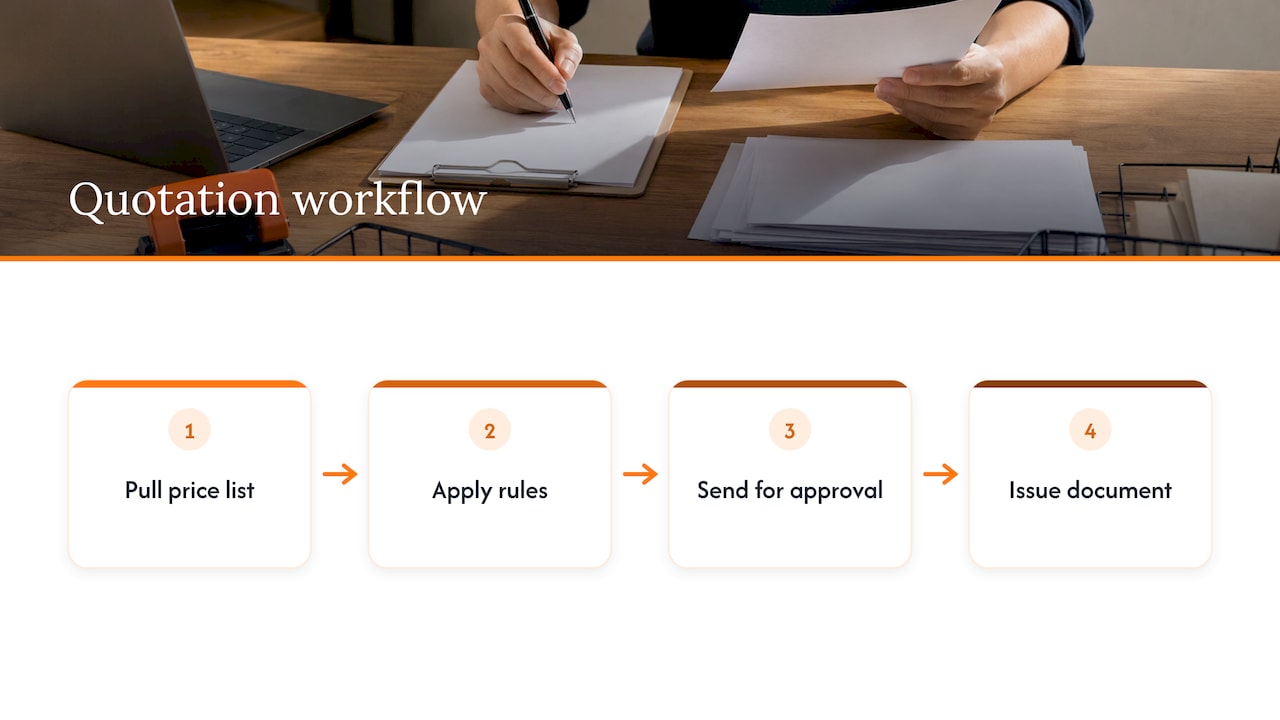
3. Quotation generator. The same Lynqra guide describes a food production SME that cut quotation time from 2 hours to 6 minutes by automating quotation generation and approval. The pattern is simple: pull the price list, apply rules, send for approval, issue the document.
Operations
4. Inventory and order tracker. Superblocks lists inventory trackers that sync with warehouses among the most common examples. For a small retailer or trader, the starting point is one live stock count that everyone trusts.
5. Point-of-sale and daily sales view. For shops, cafés and service counters, the sale itself is the operational data. Our POSFlow product is built around that, and you can run a sample sale from product to payment to see how it behaves.
6. Queue management. Walk-in clinics, service centres and salons lose time when the queue lives in someone’s head. QueueFlow covers this, and our page on a queue management system in Singapore goes into the detail.
7. Price list management. When prices change across channels, one source of truth stops mismatched quotes. PriceFlow is our product for that job.
People and teams
8. Attendance and live presence view. Instead of collecting sign-in sheets at month end, a manager sees who is in, late or out today. You can turn attendance into a live operating view in our PresenceFlow demo.
9. Onboarding portal. A checklist for new hires, with documents, accounts to set up and who is responsible for each step. Vybe puts the onboarding checklist in its HR category. We have also collected nine internal portal examples for SMEs that teams actually use.
10. Knowledge base or runbook. The steps for opening the shop, handling a refund or restarting a machine, written once and kept current. It matters most when a key person is on leave.
Sales and events
11. Lead tracker. A lightweight CRM with pipeline stages, account history and follow-up reminders, which Vybe also lists for sales teams. LeadsFlow is our ready product for this.
12. Event registration and check-in. Sign-ups, confirmations and on-the-day attendance in one place. EventFlow covers registration for workshops, seminars and member events.
Dashboards cut across all twelve. A leadership view can pull revenue, usage and support data into one screen. If you are planning one, our guide to operations dashboard metrics shows what an SME should track first.
Quick reference: example, problem and starting point
| Example | Problem it removes | Typical starting route |
|---|---|---|
| Approval app | Requests lost in email and chat | Adapt or build |
| Invoice routing | Late or missed payments | Adapt, often with automation |
| Inventory tracker | Conflicting stock counts | Ready product or adapt |
| POS and sales view | Manual end-of-day totals | Ready product |
| Queue tool | Unclear waiting order | Ready product |
| Attendance view | Month-end sign-in sheets | Ready product |
| Lead tracker | Forgotten follow-ups | Ready product |
| Onboarding portal | Inconsistent new-hire steps | Adapt or configure |
| Dashboard | Reports assembled by hand | Adapt |
The last column is a general guide. Your workflow decides the answer, which is why we look at it first.
Why SMEs build these tools at all
The pressure is real. A case study cited by Travelstop quotes research that Singaporeans spend 380 hours a year on routine tasks, including preparing expense claims and reports by hand. That figure dates from 2019, so read it as a sign of scale, not a current measurement.
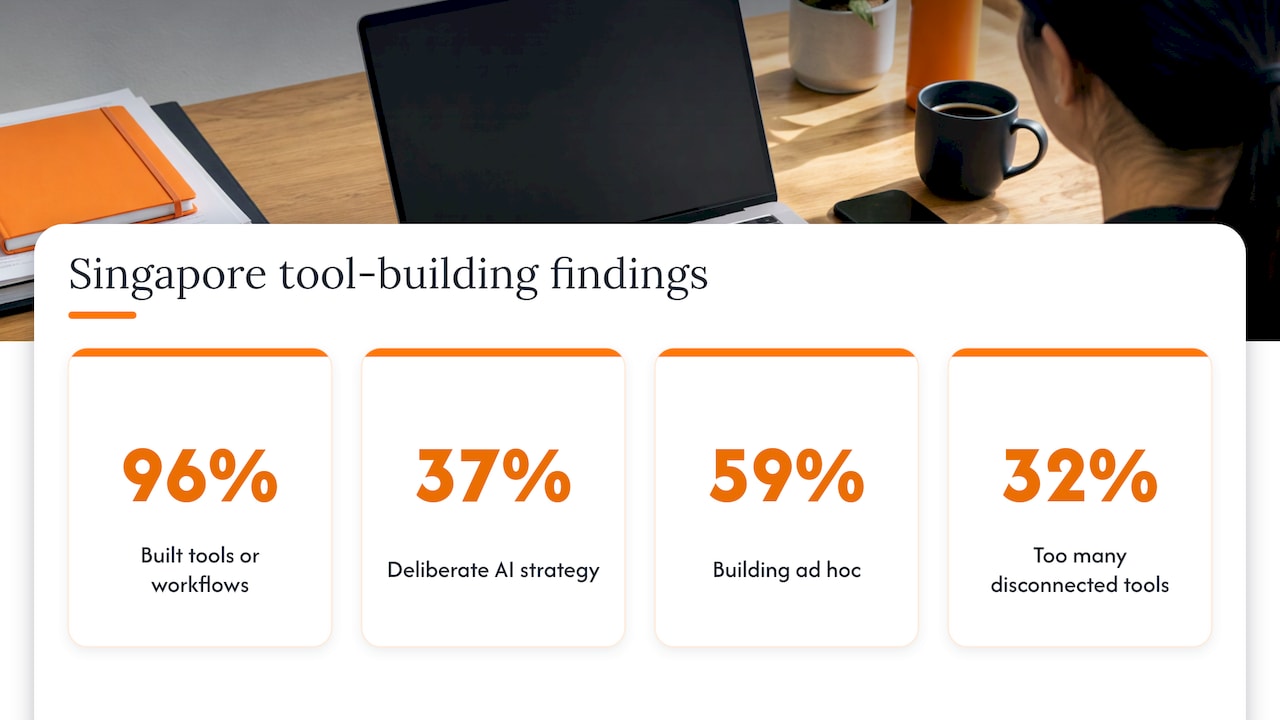
More recent Singapore data shows a shift towards building. In research by Remote reported by HCA Magazine, 96% of Singapore respondents said their organisations had built internal tools, automations or workflows rather than buying off-the-shelf software in the past 12 months. The same report found that only 37% described custom AI development as a deliberate strategy, while 59% were building ad hoc, solving problems as they arose.
That gap is the lesson. Building is easy to start and hard to keep tidy. The same report says 32% had too many disconnected tools and experiments to manage. A clear scope and a named owner for every tool prevent most of that.
How to choose: use, adapt or build
We suggest working through three questions in order.
- Does a ready product already do 80% of this? If yes, use it. One decision guide for Singapore SMEs advises to buy first and build only at the edges, since buying is justified on speed and cost.
- Is it close, but your process has quirks? Adapt an existing foundation: a POS, queue, registration, lead or attendance tool changed to fit your steps.
- Is the workflow genuinely unique? Build from scratch. Lenka Studio’s planning guide says custom development makes sense when requirements are unique or need deep integration, high performance or strong security.
The cost comparison should run over two to three years, not on the first invoice. The same build-vs-buy guide counts onboarding, training, integration and switching costs for bought tools, and development, hosting, maintenance, security and key-person risk for built ones. If you are weighing the options in detail, our five tests for build versus buy are a good checklist, and build versus buy decisions also come up when you are integrating AI agents into a tool.
A low-code platform is a fourth route. One Singapore article says low-code can fill the gap for lightweight dashboards, inspection forms and job tracking that are too specific for off-the-shelf software and too small for a bespoke build. It also warns about shadow IT, over-customisation and the need for clear ownership.
Planning your first internal tool
The order below keeps scope small and risk low.
- Pick one repeatable task. Choose something that is repetitive, structured and a source of friction. A planning guide for Singapore businesses suggests mapping the current process: who starts it, who reviews it, where it stalls, what data it needs and what the exceptions are. It also warns against automating a bad process unchanged. Our process mapping guide for small businesses walks through this.
- Name the problem before the features. Lenka Studio notes that SMBs often start from a feature list. State the problem, who has it, and what “fixed” looks like.
- Identify the source of truth. Decide which database or sheet holds the correct data, then connect the tool to that, as Emergent advises.
- Define roles and permissions. Appsmith’s guide stresses that access control keeps people, such as interns, away from tasks they should not touch.
- Test the odd cases. Refunds, cancelled orders, a person with two roles. Normal cases rarely break a tool.
- Assign an owner. Someone maintains it, reviews changes and decides when it is retired.
Security and PDPA basics
Most internal tools hold personal data: staff details, customer contacts, attendance. In Singapore that brings the Personal Data Protection Act into play. PwC’s overview states that the PDPA applies to all organisations for activities involving personal data in Singapore unless expressly excluded, with a maximum penalty for serious breaches of 10% of Singapore turnover where turnover exceeds S$10 million, and S$1 million otherwise.
On the practical side, SecurityPulse notes that PDPA Section 24 requires reasonable security arrangements and that the PDPC has cited weak password policies and outdated software in enforcement decisions. For an internal tool, that means role-based logins, strong passwords, software kept up to date, and a clear record of what data the tool holds. For a specific legal question about your business, speak to a lawyer or your data protection officer.
Funding: a change to check
Many SMEs used the Productivity Solutions Grant to part-fund automation. According to Peakflo, PSG was replaced by EDGE on 30 September 2026. Support terms and eligible solutions change, so check the Enterprise Singapore website for the current scheme before you commit to a project, and do not pay a deposit on the assumption that you qualify.
Our view on internal tools
Most SMEs do not need a big build. They need the simplest suitable tool for one painful workflow, and a clear idea of what it will cost before anyone writes code.
That is why we start with the workflow, not the technology. We ask who does the task, where it stalls and what the team uses today. Then we recommend a ready product if one fits, an adapted product if it nearly fits, and a custom build only where neither does.
We think this order is fairer to a business owner. You are not asked to write a technical brief, and you are not pushed into a commitment. Your process details stay confidential throughout.
Our free app fit review is designed to show the most economical route and an early cost direction. If a build is the right answer, it is scoped clearly first.
Ronald
How we can help
If one of the twelve examples sounds familiar, we can look at it with you. We offer custom web apps, internal business tools and workflow automation, plus customisation of our ready products. Our custom software development page explains how a bespoke build works, and the SME business automation page covers automation.
Book a free app fit review through FlowLab ↗. You can also try our product demos ↗ or see real product work ↗ first. If you are comparing developers, our guide on how to choose an app developer in Singapore lists what to ask.
FAQ
What are some examples of internal tools?
Common examples are approval apps for expenses and purchases, inventory and order trackers, onboarding portals, knowledge bases, lead trackers and analytics dashboards. Superblocks frames these as function-focused tools rather than customer-facing ones. For an SME, the best first tool is usually the one that replaces a manual task done every week.
What does internal tooling mean?
It means software used by employees to run the organisation’s daily work, with business rules and role-appropriate access to approved data. Baserow defines an internal tool as software built for staff rather than external customers. It can range from a simple approval tracker to a full operations system.
Should a small business build or buy an internal tool?
Start with a ready product and adapt it if the process has quirks. Build from scratch only when requirements are unique or nothing on the market serves the gap. Compare the total cost over two to three years, including maintenance and security, not just the first price.
Do internal tools need to comply with the PDPA?
Yes, if they handle personal data of people in Singapore, such as staff or customer details. That means reasonable security arrangements, controlled access and knowing what data the tool holds. Ask your data protection officer or a lawyer about your specific case.
Sources
- What Are Internal Tools? Definition and Examples (ToolJet)
- What Are Internal Tools? Definition, Examples & How It Works (Emergent)
- Internal tools: Types, benefits, and how to build them (Softr)
- 5 types of internal tools and how to build one (Vybe)
- 17 Internal Tools Examples You Can Build For Your Business (Superblocks)
- Understand what an internal tool is with examples (Baserow)
- Document Management System Singapore: SME Guide 2026 (Lynqra)
- How Funding Societies improved their expense workflow (Travelstop)
- Homegrown tools risk legal and operational exposure (HCA Magazine)
- Should Singapore SMEs Build or Buy AI Tools in Mid-2026?
- How to Plan and Build a Web App That Scales (Lenka Studio)
- How to leverage low-code tools for your SG business
- The Ultimate Internal Tool Builder Guide (Appsmith)
- Singapore data protection law overview (PwC)
- PDPA Compliance Checklist for Singapore SMBs (SecurityPulse)
- AI Invoice Processing for Singapore SMEs (Peakflo)