
The Personal Data Protection Act (PDPA) applies to your business however small it is. PDPC, the Personal Data Protection Commission that enforces it, states that it covers all organisations in Singapore that handle personal data regardless of size. For an SME, the practical route is simple: find out what personal data you hold and where it flows, then fix consent, security, retention and breach response around those real systems. We build and adapt business apps for Singapore SMEs at FlowLab, and the businesses that find this easiest are the ones that know how their data moves through their daily workflow.
TL;DR
- The PDPA covers every organisation in Singapore that handles personal data, including a five-person shop with a customer spreadsheet.
- Start with a data inventory: what you collect, why, where it is stored and who can see it. Consent forms written before that are guesswork.
- A notifiable data breach must be reported to PDPC no later than three calendar days after you assess it as notifiable.
- Your CRM, booking tool, POS or custom app is where most of your personal data sits, so build the rules into those systems rather than into a policy document nobody opens.
- The checklist below has 10 steps in a sensible order, and PDPC’s own free tools can help you start.
Table of Contents
- What the PDPA asks of an SME
- Why start with a data inventory
- A 10-step PDPA checklist for SMEs
- Making your apps and CRM PDPA-ready
- Where to get free help
- Our view
- Talk to us about your workflow
- FAQ
- Sources
What the PDPA asks of an SME
Personal data is any data about an individual who can be identified from it: a name with a phone number, an email address, an NRIC number, a photo, an attendance record. If your business collects, uses or discloses it, the PDPA’s data protection obligations apply.
PDPC’s Data Protection Obligations page sets them out. In plain terms, you must:
- Tell people why you collect their data, on or before collection.
- Get consent and let people withdraw it on reasonable notice, explaining the consequences.
- Use data only for reasonable purposes that a person would consider appropriate and has agreed to. You cannot demand more consent than the product or service needs.
- Keep data accurate where it affects decisions about the person or is disclosed to others.
- Protect it with reasonable security arrangements.
- Stop keeping it when you no longer need it.
- Transfer it overseas only with comparable protection. This matters if your software is hosted abroad.
- Give people access and correction on request, including how their data was used or disclosed in the preceding year.
- Report notifiable breaches to PDPC and, where significant harm is likely, to the affected individuals.
The law has been tightened over time. According to Drew & Napier’s Legal 500 chapter on Singapore, the 2020 amendments brought in mandatory breach notification, wider deemed consent, new consent exceptions for legitimate interests and business improvement, and higher financial penalties from 1 October 2022. The same chapter notes that the data portability obligation only takes effect once regulations are issued, so you cannot yet be asked to port data to another provider.
What does not count
Business contact information, such as a name, job title, business phone and business email, is outside the data protection provisions, according to PDPC’s Key Concepts guidelines. A card dropped into a seminar bowl is a business contact. A personal mobile number given for a delivery is not. Mixed lists need care, which is another reason to know what you hold.
Why start with a data inventory
Most compliance lists put paperwork first. We think the order should follow how data actually moves in your business. If you do not know that your front-desk tablet, your WhatsApp orders and your old Excel sheet all hold customer phone numbers, a privacy policy will describe a business that does not exist.
An inventory is a short table. For each place you keep personal data, record:
- What you hold (names, phone numbers, NRIC, photos, payment details).
- Why you collect it, in one sentence.
- Where it lives (app, shared drive, email, paper).
- Who can see it.
- How long you need it.
- Whether it leaves Singapore, for example to an overseas cloud host.
This is the same exercise as mapping a workflow: who enters what, who reads it, where it ends up. Our own work with SMEs begins with a workflow review, so the data map often falls out of that conversation. If your processes are still on paper, our guide on moving from paper to a digital workflow shows how to take stock before you digitise.
A 10-step PDPA checklist for SMEs
The steps below follow the order that ComplyHQ’s 2026 SME checklist recommends: people first, then data, then rules, then ongoing habits. The wording and the practical examples are ours.
| Step | What to do | Done when |
|---|---|---|
| 1. Appoint a DPO | Name someone responsible for data protection and publish a business contact for them | A named person and a contact on your website |
| 2. Build a data inventory | Record what you hold, why, where and who sees it | One table you update when systems change |
| 3. Fix consent | Collect consent clearly and let people withdraw | No pre-ticked boxes; a withdrawal route that works |
| 4. Notify purposes | Say why you collect data, at or before collection | A short notice at every collection point |
| 5. Secure the data | Access control, encryption, patching, staff training | Only the people who need data can open it |
| 6. Set retention | Decide how long each data type is kept and how it is destroyed | A retention schedule and a deletion routine |
| 7. Plan for breaches | Write down who investigates, decides and reports | A one-page plan staff can find |
| 8. Handle requests | Set up access and correction processes | You can answer a request without a scramble |
| 9. Check transfers | Confirm overseas hosts give comparable protection | Contracts and hosting locations on record |
| 10. Check Do Not Call rules | If you telemarket, check the registry first | A check built into your calling or messaging process |
Revisit the list quarterly and whenever you add a system, a vendor or a new collection point. Compliance goes stale quickly because your tools change.
Step 1: the DPO is a role, not a hire
PDPC’s Kickstart page describes the Data Protection Officer’s work in three stages: collecting personal data responsibly, caring for it, and helping individuals use their rights. In a small business, the owner or an operations manager usually holds the role alongside other work. What matters is that one named person owns it.
Steps 3 and 4: consent and purposes in practice
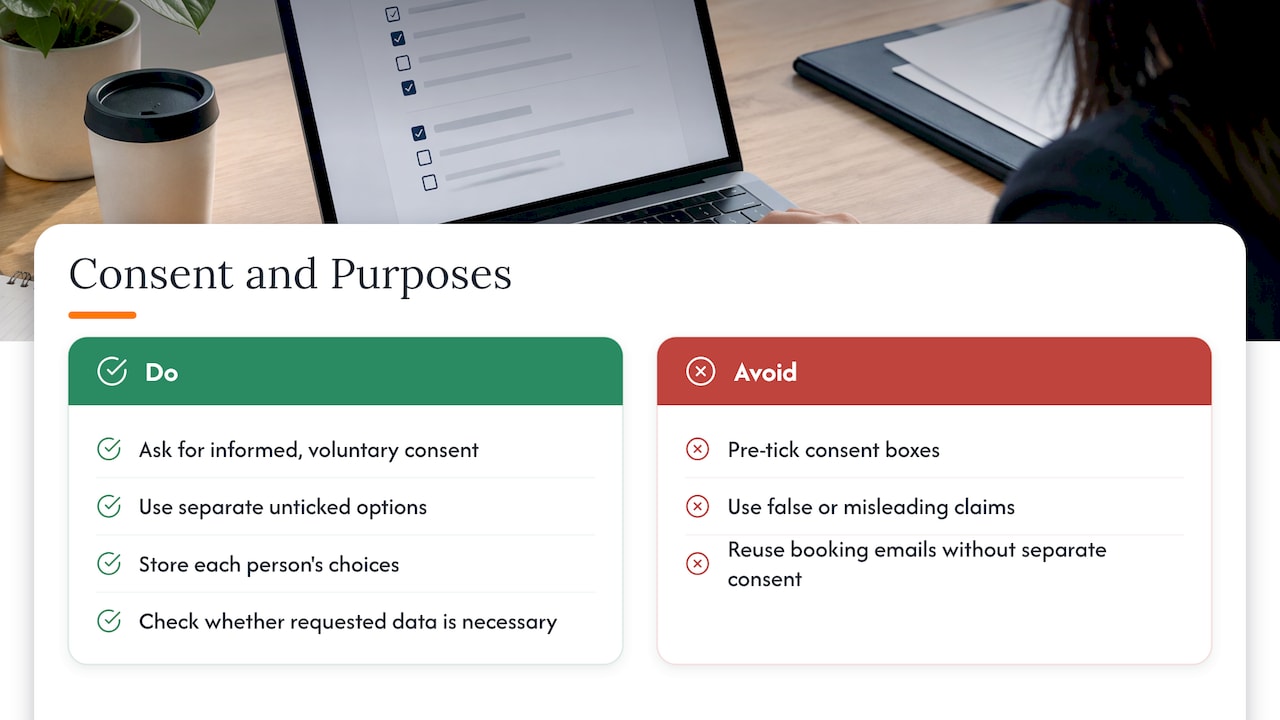
Consent must be informed and voluntary. Pre-ticked boxes do not count, as SecurityPulse’s SMB checklist notes. PDPC’s Key Concepts guidelines add that you may not obtain consent through false or misleading information, and that where a service cannot be provided without consent, you should ask whether the data requested is really necessary for it.
A worked example: a salon collects a client’s email so it can send booking confirmations. Using that email for a monthly promotion is a different purpose. SingSafe’s SME checklist makes the same point: an email collected for order updates cannot be reused for marketing without separate consent. In an app, that means two separate, unticked options at sign-up, and your database storing which one each person chose.
Step 7: the three-day clock
Since 1 February 2021, notifiable breaches must be reported. SingSafe summarises the rule: a breach is notifiable if it is likely to cause significant harm or affects 500 or more individuals, and PDPC must be told as soon as practicable, no later than three calendar days after you assess it as notifiable. Affected individuals must also be told where significant harm is likely.
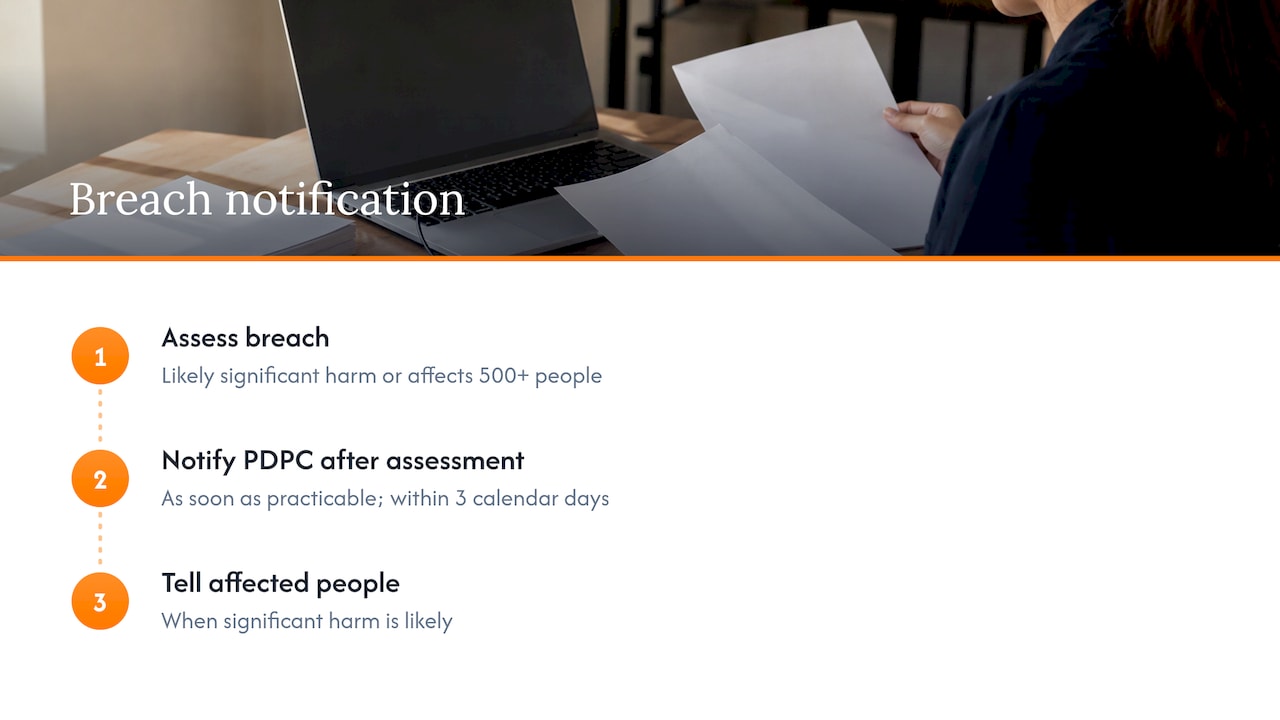
Three days includes weekends. The plan therefore needs four answers written down in advance: who investigates, who decides whether it is notifiable, who files with PDPC, and who speaks to customers.
Making your apps and CRM PDPA-ready
The checklist is easy to read and harder to apply to the software you use every day. This is where the law meets your daily operations.
Build data protection into the design
PDPC’s Guide to Data Protection Practices for ICT Systems collects practices from past guidelines and lessons from real breach cases. IMDA’s SS 714:2025 implementation guide goes further on design. It calls for protection from the earliest design stage, minimised collection, opt-in consent for marketing, role-based access control, impact assessments for new systems, no live personal data in test environments, and vulnerability and penetration testing.
Translated for an SME commissioning or adapting an app, the questions are:
- Does every form field earn its place? If you do not need a date of birth, do not ask for it.
- Can staff see only what their role needs? A cashier does not need the full customer history.
- Is marketing consent a separate opt-in, stored with a date?
- Can you export or delete one person’s record when asked?
- Is test data made up rather than copied from real customers?
- Is there an audit trail showing who opened or changed a record?
These are far cheaper to settle before an app is built than after. Our guide to security for small business apps covers the wider security side, and our comparison of multi-tenant and single-tenant setups explains how data separation affects who can see what.
Check your CRM and lead lists
A CRM is usually the biggest store of personal data in a small business. Run through it with these checks:
- Source and purpose. For each lead, can you say where it came from and what the person agreed to?
- Marketing consent. Is there a field that records opt-in, and does your mailing tool respect it?
- Retention. Old exports and abandoned leads are what SecurityPulse calls liability without value. Section 25 of the PDPA requires you to stop retaining data once it is no longer needed, so define a period for each category and delete securely.
- Access. Who has a login, and do ex-staff still have one?
- Vendor terms. Is there a written contract with your CRM provider?
On the last point, PDPC’s Key Concepts guidelines state that you have the same PDPA obligations for data a vendor processes for you as if you processed it yourself. The vendor, as a data intermediary, is itself subject only to the protection, retention limitation and breach notification obligations, and must tell you without undue delay once it has credible grounds to believe a breach occurred. So do due diligence and set the vendor’s scope in writing.
If your leads move between spreadsheets, inboxes and chat apps, a single tracked process is easier to protect. Our lead tracking workflow guide shows how to structure one.
Do not forget email
Breaches often start with a spoofed or hijacked email account rather than a clever attack. Authenticating your sending domain is a routine safeguard, and this walkthrough of a DMARC rollout and reporting explains how it works for software businesses that send system emails.
Fewer tools, fewer places for data to sit
Every extra subscription is another place customer data can be copied, forgotten or left open. If you are running many overlapping tools, our SaaS consolidation plan helps you cut down. That shrinks both your costs and your data inventory.
Where to get free help
You do not have to start from a blank page. PDPC’s PDPA Assessment Tool lets you answer questions by category as implemented, partially implemented, not implemented or not applicable, and gives you results at the end. PDPC also directs SMEs to its Data Protection Essentials framework as a starting point on its Kickstart page.
These tools tell you where the gaps are. Closing them in your own operations is a systems job: forms, permissions, retention routines, logs. That is where an app built or adapted around your workflow helps.
Our view
Most SME owners tell us the same thing about data protection: it feels like a legal problem, so it gets pushed back. We see it as a workflow problem. Compliance asks who collects data, where it goes, who sees it and when it is deleted. Those are the questions we ask about any process before we recommend software.
That is why we start with a review of the workflow, not a technical brief. We recommend a ready-made product first where one fits, an adapted solution where it nearly fits, and a custom build only where the process really is your own. A smaller, simpler system is usually easier to keep tidy, with fewer fields, fewer people with access and fewer copies.
Our app fit reviews are free, and we keep what you tell us confidential. Bring your data inventory, or even a rough list of the tools you use, and we can talk through the simplest suitable route.
Ronald
Talk to us about your workflow
If your customer records sit across spreadsheets, chat threads and a patchwork of tools, we can review the workflow with you and show the most economical route to a single, tidier system. We offer ready-to-use products such as POSFlow, QueueFlow, EventFlow and LeadsFlow, adaptation of those foundations, and custom web apps when your process is genuinely your own.

Start with the free app fit review on our main page and we will clarify the likely cost before any development begins.
FAQ
Does the PDPA apply to a very small business?
Yes. PDPC says the PDPA applies to all organisations in Singapore that handle personal data, whatever their size. A sole proprietor with a customer contact list has the same core obligations as a large company, though the measures that count as reasonable will be proportionate to what you hold.
What is the first thing an SME should do?
Appoint a person to own data protection and build a simple inventory of the personal data you hold. Once you know what you hold, consent notices, security, retention and breach planning become much easier to write accurately.
How quickly must we report a data breach?
If you assess a breach as notifiable, because it is likely to cause significant harm or affects 500 or more people, you must tell PDPC as soon as practicable and no later than three calendar days after that assessment. Affected individuals must also be told where significant harm is likely. Write your response plan before an incident, because three days leaves little time.
Do I need consent to email my customers?
For marketing, you need a genuine opt-in, not a pre-ticked box. An email given to receive order updates should not be reused for promotions without separate consent. Record when and how each person agreed so you can show it, and honour withdrawals promptly.
Can I use an overseas cloud app for customer data?
Yes, but personal data may be transferred overseas only if the recipient gives it protection comparable to the PDPA. Know where your vendors host data, and keep a written contract that sets out what they may do with it.
Sources
- PDPC: Data Protection Obligations
- PDPC: Kickstart Your Data Protection Journey
- PDPC: Advisory Guidelines on Key Concepts in the PDPA
- PDPC: Guide to Data Protection Practices for ICT Systems
- IMDA: Singapore Standard SS 714:2025 implementation guide
- Drew & Napier: Legal 500 Comparative Guides 2025, Singapore
- ComplyHQ: PDPA Compliance Checklist for Singapore SMEs (2026)
- SingSafe: PDPA Compliance Checklist for Singapore SMEs
- SecurityPulse: PDPA Compliance Checklist for Singapore SMBs (2026)
- DMARC for SaaS: Safe Rollout and Reporting