
Serverless is a way of running software where a cloud provider looks after the servers and you pay only when your code runs. Its main strengths are low cost for occasional work and automatic handling of busy spells. Its main weaknesses are rising bills for steady, heavy use, tie-in to one provider, and harder troubleshooting. For most SME owners the better first question is not “serverless or not?” but “which workflow is slowing us down?” The hosting choice follows from that answer. If you want a second opinion on the workflow, FlowLab offers a complimentary app fit review that points to the most economical route and gives early cost direction before any development starts.
TL;DR
- Serverless means the provider runs and scales the infrastructure, and you are billed for the time your code actually runs.
- It suits occasional, event-driven, spiky work such as form handling, notifications, file processing and short-lived back-end tasks.
- It can cost more for long-running or constantly busy workloads, and the compute line is often only part of the real bill.
- Lock-in, cold starts, debugging and data-handling duties are the main drawbacks to weigh.
- For a small business, the workflow and the simplest suitable solution matter more than the architecture label.
Table of Contents
- What serverless actually means
- The pros of serverless
- The cons of serverless
- Pros and cons at a glance
- When serverless is a good fit
- When it is a poor fit
- Does serverless save a small business money?
- A simple way to decide as a business owner
- Our view on serverless for SMEs
- Where FlowLab fits
- FAQ
- Sources
What serverless actually means
The name is misleading. Servers still exist. IBM explains that they are managed by a cloud provider and are invisible to the developer. AWS describes the provider as the party that provisions, scales and maintains the underlying components, and that handles operating system management, security patches, load balancing, monitoring and logging.
The code is typically split into small functions. According to the CNCF serverless whitepaper, these are uploaded to a platform, then executed, scaled and billed in response to exact demand.
In plain terms, think of it like a taxi against a leased car. You pay for the trip, not for the car sitting in the car park. That is excellent when trips are occasional. It becomes less attractive when you are driving all day.
One point matters for owners: serverless does not remove responsibility. The same AWS page describes a shared security model. The provider is responsible for the security of the cloud, and you are responsible for security in the cloud: your data, your access rules, your settings.
The pros of serverless
You pay for use, not for idle time
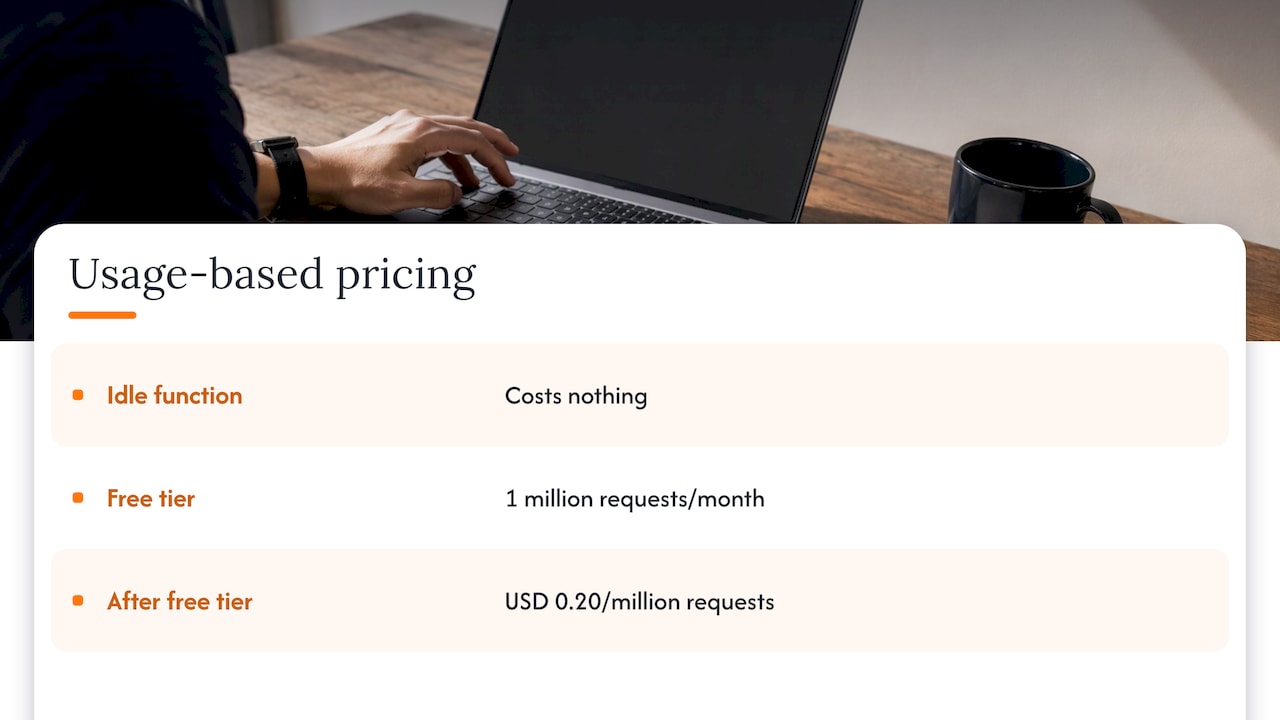
This is the headline benefit. Red Hat notes that a serverless function sitting idle costs nothing, and that billing typically follows a pay-as-you-go model. OVHcloud Singapore makes the same point: you pay for resources consumed during execution rather than for idle capacity.
For a small business, this fits tasks that run a few times a day or a few times an hour. Examples are sending a confirmation after a booking, resizing uploaded photos, or producing a nightly report.
As a price reference, Wise reports that AWS Lambda in the Singapore region has an always-free tier of 1 million requests a month. Its figures, as of 25 April 2025, start at USD 0.20 per million requests after that, in its guide to AWS pricing in Singapore. Cloud price lists change, so check the provider’s own pricing page for the current numbers.
Scaling happens without you
If a promotion, ticket release or deadline sends a rush of users, the platform adds capacity automatically. TechTarget lists automatic scaling for unpredictable traffic among the main advantages. You do not plan capacity or wake up at night to add a machine.
Less infrastructure work
Patching, operating system updates and capacity planning move to the provider. The CNCF working group is careful here. It says operations people are not made redundant. Instead, the time spent on provisioning, maintenance, updates and capacity planning is freed for more business-critical tasks. For a team of five with no IT staff, that shift is the real appeal.
Good for small, event-driven jobs
Typical examples are back-end logic behind an API, scheduled maintenance tasks, file processing, and connecting systems through webhooks or messages. Each is a short job that starts when something happens, then ends.
The cons of serverless
Long or constant workloads can cost more
Because you are billed for running time, steady work adds up. IBM states that serverless models are not designed to run code for long periods, so long-running processes can cost more than on dedicated servers or virtual machines. Cloudflare’s Learning Center says the same.
So a system used all day, every day, such as a busy point-of-sale back end, may not be the best candidate for pay-per-use pricing.
Billing is not always what you expect
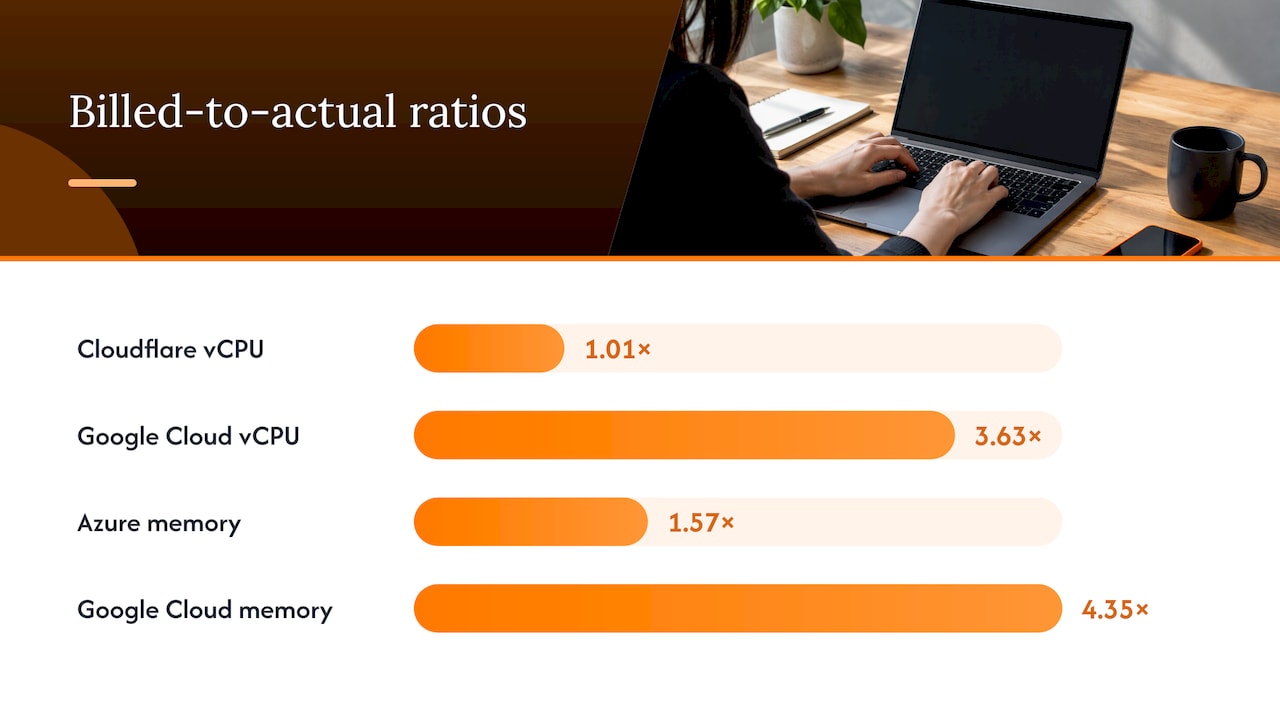
A 2025 University of British Columbia study compared billed usage with real usage on public serverless platforms. Billable vCPU time exceeded actual CPU use by 1.01 times on Cloudflare up to 3.63 times on Google Cloud, on average. Billable memory exceeded real memory use by 1.57 times on Azure up to 4.35 times on Google Cloud. The cause is billing by allocated time and rounding up.
In practice, the function cost is only one line. A function that calls a database, a queue and storage generates charges for each. One 2026 LeanOps analysis of a workflow handling 5 million requests a month put the compute at about $150 against a total of $400 to $600 once those services were added. Treat that as an illustration, not a price list. The lesson is to cost the whole workflow, not the function.
Tie-in to one provider
OVHcloud Singapore points out that serverless is typically tied to specific cloud providers. Moving later can mean rewriting parts of the app. For an SME that plans to keep its tools for years, that exit cost belongs in the decision.
Cold starts
When code has not run recently, the first request can be slower while the platform starts it up. Cloudflare notes this can degrade performance. For a back-office report nobody notices. For a customer at a counter waiting for a payment screen, it matters.
Debugging and monitoring are harder
Work is spread across many small functions, so tracing a fault takes more effort. TechTarget lists monitoring and debugging challenges among the main disadvantages, along with limits on runtime, execution time and supported languages.
Security and data-handling duties remain yours
TechTarget also flags that each function can serve as a potential entry point for attack. Cloudflare adds that serverless providers run code from several customers on one server (multitenancy). If that is not configured properly, data could be exposed, though well-sandboxed networks see little or no impact.
If your app holds customer details, Singapore’s Personal Data Protection Act applies. As summarised by 4xfour, it covers consent, purpose limitation, access and correction rights, retention and transfer limits, and reasonable security arrangements. A sound habit is to apply zero trust access controls so that every login and every function is verified, and to decide early where sensitive data is hosted. Our own guide to security for small business apps covers the practical steps for Singapore SMEs.
Pros and cons at a glance
| Question | Serverless tends to help | Serverless tends to hurt |
|---|---|---|
| Traffic pattern | Spiky or occasional | Steady and constant |
| Job length | Short tasks | Long-running processes |
| Cost | Pay only when code runs | Bills that grow with constant use or many linked services |
| Team | No in-house IT | Need for deep control of the environment |
| Speed | Background work | Strict real-time response |
| Future moves | Quick start | Tie-in to one provider |
When serverless is a good fit
Several sources converge on the same pattern. OVHcloud Singapore recommends it for tasks that are event-driven, have variable workloads or need rapid growth. The best candidates are short-lived, loosely coupled and event-driven, as Hyve’s trade-off analysis puts it.
For an SME, that usually means:
- Background jobs: confirmation emails, reminders, file conversions, nightly reports.
- Traffic spikes: a campaign, a registration window or a seasonal rush, followed by quiet weeks.
- Connections between tools: a form submission that creates a record and notifies a person.
- Small teams with no platform engineer: the provider carries the operational layer.
When it is a poor fit
Render’s 2025 checklist asks six questions: do you have strict latency targets, processes longer than 15 minutes, a need for persistent connections or heavy database concurrency, steady predictable traffic, a need for advanced debugging, or a need for predictable costs? If you answer yes to more than two, it says serverless probably is not the right tool.
The same logic applies to Singapore SMEs with on-site systems. Shop-floor, trading or clinical systems may need millisecond responses that a distant cloud region cannot reliably give, and healthcare, finance and public-sector work can face rules about where data may sit, according to Techease. Singapore has local data centres from AWS, Microsoft Azure, Google Cloud and Alibaba Cloud, so location is usually a configuration choice, not a barrier.
Does serverless save a small business money?
It can, in one situation: low, uneven use. If a task runs rarely, the free tier and per-request pricing may mean you pay very little. If usage is high and constant, the saving disappears and the bill can exceed that of a fixed server.
Three habits keep costs honest:
- Model the whole workflow. Add the database, storage, queue and notification charges, not only the function.
- Estimate your volume in two to three years. A price that is trivial at 10,000 requests a month looks different at 50 million.
- Count the people cost. Maintenance, monitoring and fixes are part of the bill. Our comparison of app maintenance cost in Singapore sets out the options.
The University of British Columbia researchers suggest matching a platform’s cost drivers to your workload, and merging similar functions to lower invocation fees. That is specialist work. An owner is better served by having someone price the real workflow before committing.
A simple way to decide as a business owner
You do not need to master cloud terminology to choose well. Work through the questions in this order.
- Name the bottleneck. Is it queues at the counter, enquiries that nobody follows up, event sign-ups on spreadsheets, or manual attendance records? Write down who does what today.
- Check how often it runs. A few times a day, constantly, or in bursts around events?
- Check what data it touches. Customer names, phone numbers and payment details raise the data-handling bar.
- Ask whether a ready-made product already covers it. A point-of-sale, queue, event, pricing, lead or attendance tool may already exist in a form that only needs adapting.
- Only then choose the build and hosting approach. Serverless, containers or a managed platform are a technical detail to settle once the scope is clear.
Steps 1 to 4 are about your business, not about technology. Skipping them is the most common way an SME ends up paying for an architecture it never needed. A related decision is whether you need a native app at all, which our piece on PWA versus native apps walks through, and whether the tenancy model fits, covered in multi-tenant versus single-tenant.
Our view on serverless for SMEs
We rarely begin with architecture. We begin with the work: who handles an enquiry, where a customer waits, which spreadsheet everyone is afraid to touch.
Serverless is one good answer for the right kind of job. It is not a goal. An owner who asks “should we go serverless?” usually means “will this cost me less and break less?” That question is better answered from your workflow than from a diagram.
That is why our review comes first and is complimentary. We look at the process, then recommend the simplest suitable solution: a ready-made product, an adapted one, or a custom build only when the first two do not fit. You get early cost direction before development, with no technical brief required and no jargon.
Your information stays confidential throughout. If a workload does need a bespoke app, custom builds are fixed-price projects, so you know the scope and the cost before we start.
Ronald
Where FlowLab fits
FlowLab is a Singapore app development company for SMEs. We offer custom web apps, internal business tools, workflow automation and product customisation. We also offer ready-to-use products: POSFlow, QueueFlow, EventFlow, PriceFlow, LeadsFlow and PresenceFlow for attendance.
Our complimentary app fit review starts with your workflow and tells you which route is most economical. Start with a review of your workflow ↗

If you would rather see a product first, try the product demos ↗. If you are weighing automation tools against a managed build, our article on n8n versus Zapier for SMEs compares the cost patterns.
FAQ
Is serverless good for a small business?
It can be, particularly for occasional or spiky tasks and for teams with no in-house IT. The provider handles patching and scaling, and you pay when code runs. It is a poorer match for constant, heavy workloads, so the nature of your workflow decides it.
Does serverless really cut costs?
Often for low and uneven usage, because idle time is not billed. For long-running or constantly busy workloads the bill can rise, and the function is only part of the total once databases, storage and queues are added. Cost the whole workflow before you decide.
Does serverless mean there are no servers?
No. Servers still run your code, but the cloud provider owns and manages them. You are still responsible for your data, your access controls and how your app handles personal information under Singapore’s PDPA.
Do I need to choose serverless before talking to an app developer?
No. Start from the process you want to improve: the delays, the manual steps and the volumes involved. A good developer recommends the approach after that, and the hosting model is usually a later detail.
Sources
- AWS: What is Serverless Computing?
- IBM: What Is Serverless Computing?
- CNCF serverless whitepaper
- Red Hat: What is serverless?
- OVHcloud Singapore: What is Serverless Computing?
- Wise: AWS Pricing Plans for Singapore
- TechTarget: Top benefits and disadvantages of serverless computing
- Cloudflare Learning Center: Why use serverless?
- University of British Columbia study on serverless costs (arXiv)
- LeanOps: Serverless cost optimisation
- 4xfour: How Do Cloud Services Work in Singapore
- Hyve: Serverless architecture trade-offs
- Render: When to Avoid Using Serverless Functions
- Techease: Cloud-First Strategy for Data-Heavy SMEs